Positioning
A WAR is not an "audit." It's a risk-and-waste removal plan with a prioritized delivery roadmap.
Method
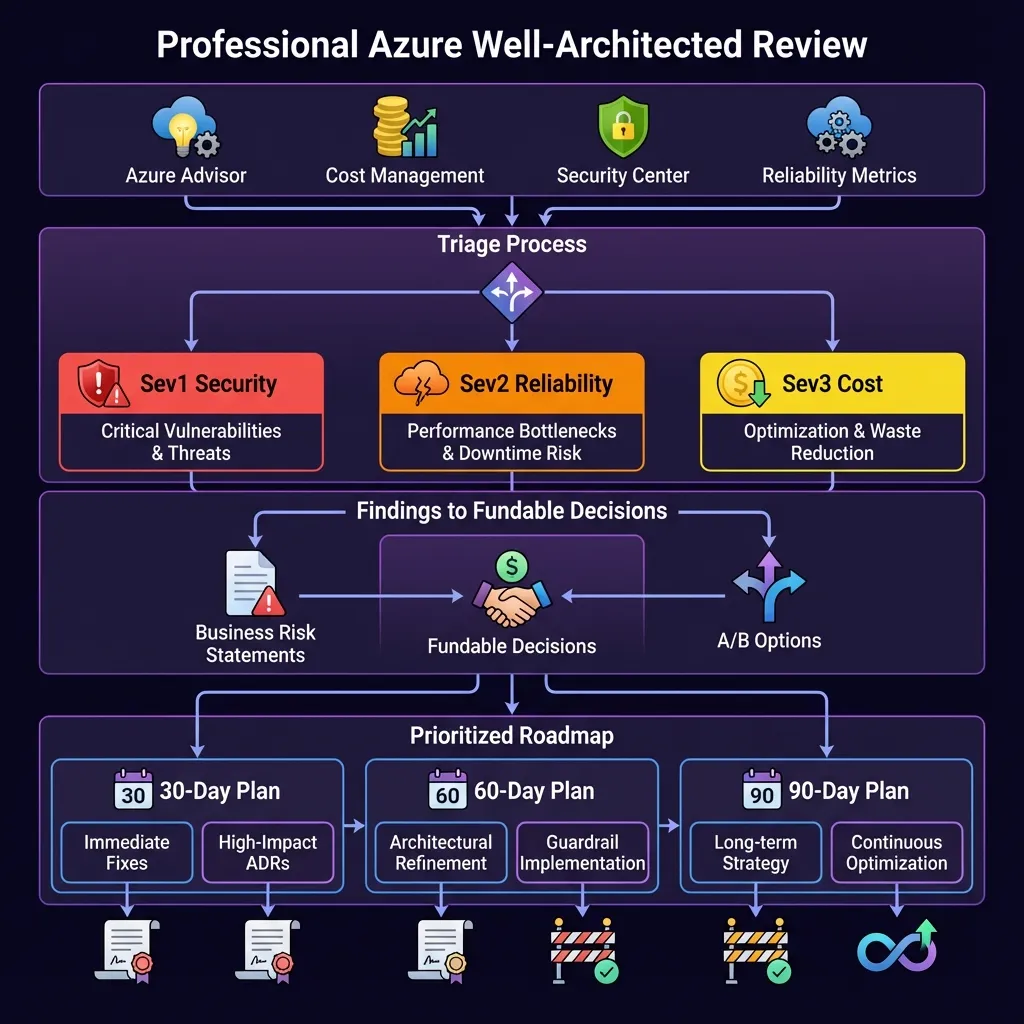
Step 1: Triage by severity + impact/effort
- Sev1 security (identity, exposure, secrets)
- Sev2 reliability (SPOFs, recovery gaps)
- Sev3 cost (waste before commitments)
Step 2: Convert findings into decisions
Capture "why" using ADRs so future teams understand trade-offs and constraints.
Step 3: Make it fundable
Each item must include:
- business risk statement
- A/B options with cost deltas
- 30/60/90 day plan
Diagram (Azure icons)
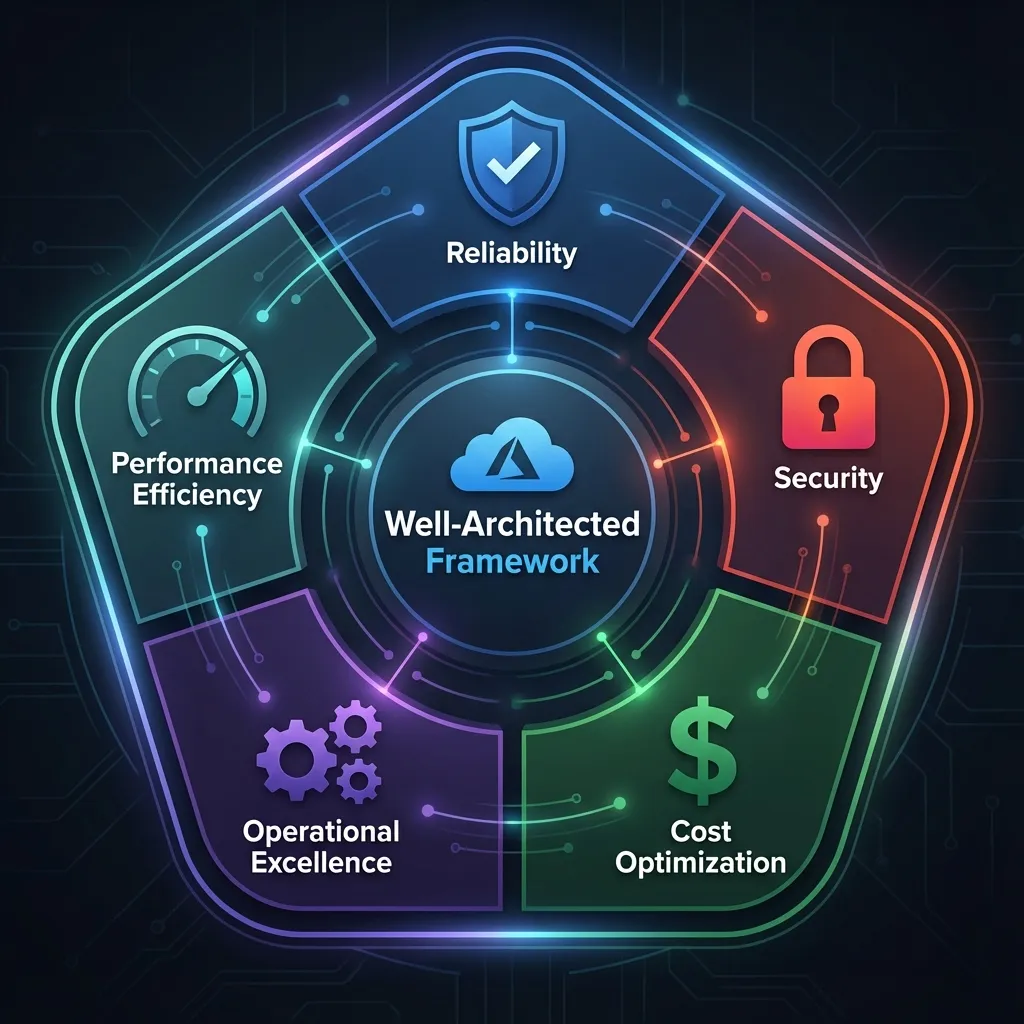
Well-Architected Framework: The Five Pillars
The Well-Architected Framework provides a structured approach to evaluating your architecture across five critical pillars. Understanding these pillars is essential for conducting effective reviews and creating actionable roadmaps.
The Five Pillars
1. 🛡️ Reliability
Focus: Resiliency, availability, and recovery capabilities
Key Concerns:
- Design for business requirements and SLA targets
- Build resilience at every layer (application, data, infrastructure)
- Implement automated recovery and failover mechanisms
- Test disaster recovery procedures regularly
Common Findings: Single points of failure, inadequate backup strategies, untested DR plans
2. 🔒 Security
Focus: Data protection, threat detection, and mitigation
Key Concerns:
- Protect confidentiality, integrity, and availability
- Implement defense in depth with multiple security layers
- Use identity as the primary security perimeter
- Enable continuous threat detection and response
Common Findings: Exposed secrets, overly permissive access, missing encryption, no threat monitoring
3. 💰 Cost Optimization
Focus: Cost modeling, budgets, and waste reduction
Key Concerns:
- Optimize on usage and rate utilization
- Implement cost allocation and chargeback
- Right-size resources based on actual utilization
- Leverage commitment-based discounts (Reserved Instances, Savings Plans)
Common Findings: Oversized VMs, orphaned resources, no tagging strategy, missing budget alerts
4. ⚙️ Operational Excellence
Focus: Holistic observability and DevOps practices
Key Concerns:
- Streamline operations with standards and automation
- Implement comprehensive monitoring and alerting
- Use Infrastructure as Code for all deployments
- Enable safe deployment practices (blue/green, canary)
Common Findings: Manual deployments, inadequate monitoring, no runbooks, configuration drift
5. ⚡ Performance Efficiency
Focus: Scalability and load testing
Key Concerns:
- Scale horizontally to meet demand
- Test performance early and often
- Monitor and optimize continuously
- Use caching and CDN strategically
Common Findings: No auto-scaling, untested performance, missing caching, inefficient queries
Understanding Pillar Tradeoffs
Every architectural decision involves tradeoffs. The key is making informed choices aligned with business priorities:
| Decision | Reliability | Security | Cost | Performance |
|---|---|---|---|---|
| Multi-region deployment | ✅ High availability | ✅ Geographic redundancy | ❌ 2x infrastructure cost | ✅ Lower latency |
| Azure Firewall Premium | ➡️ Neutral | ✅ Advanced threat protection | ❌ Higher monthly cost | ⚠️ Slight latency increase |
| Reserved Instances (3-year) | ➡️ Neutral | ➡️ Neutral | ✅ 30-70% savings | ➡️ Neutral |
| Aggressive auto-scaling | ✅ Better resilience | ➡️ Neutral | ❌ Higher variable costs | ✅ Handles traffic spikes |
Conducting the Well-Architected Review
A structured review process ensures comprehensive coverage and actionable outcomes.
Continuous Improvement Cycle
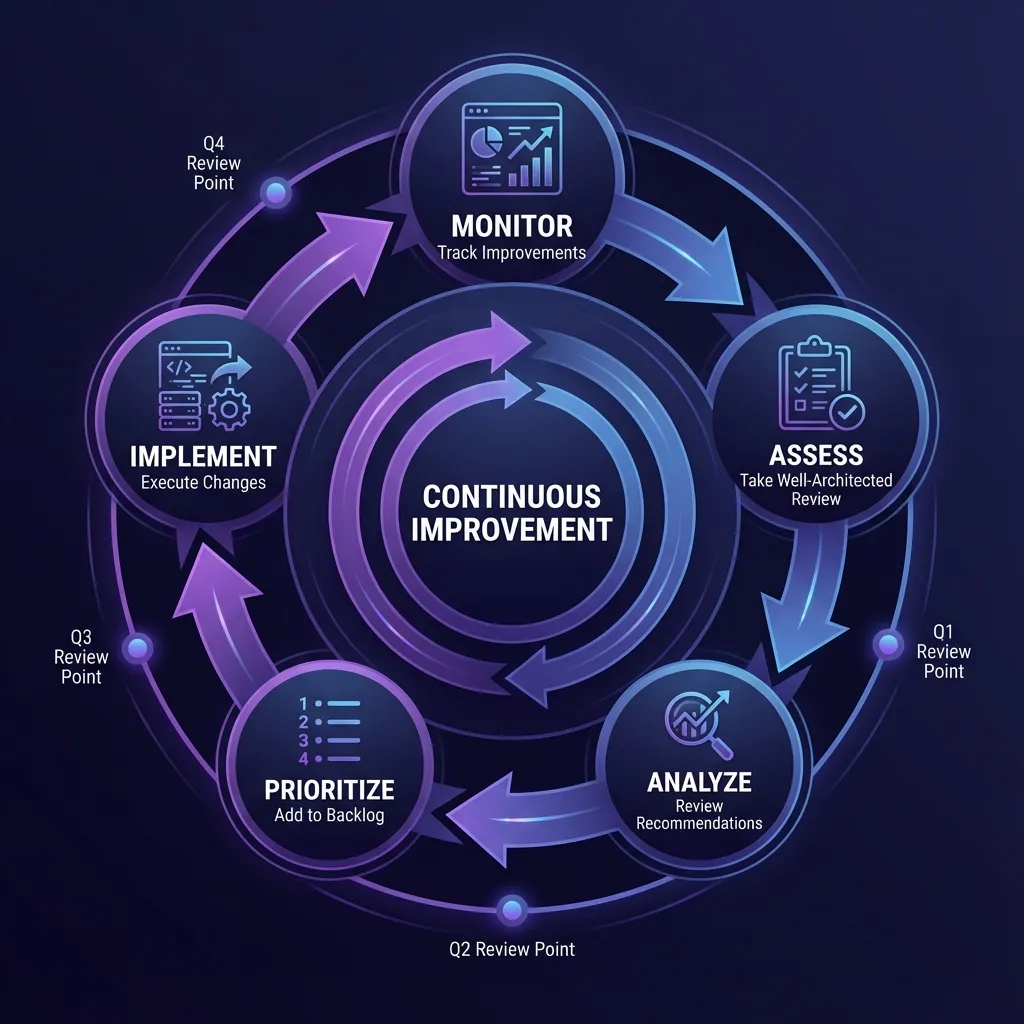
When to Conduct Reviews
Greenfield Workloads (New Deployments)
- Timing: During initial design process
- Approach: Enter proposed decisions, use guidance as baseline
- Benefit: Refine design before deployment, avoid costly rework
- Cadence: Re-assess at each major design milestone
Brownfield Workloads (Existing Environments)
- Timing: Part of continuous improvement cycle
- Approach: Assess current state, identify gaps
- Benefit: Track improvements over time with milestones
- Cadence: Every 4 months (quarterly reviews recommended)
Assessment Workflow
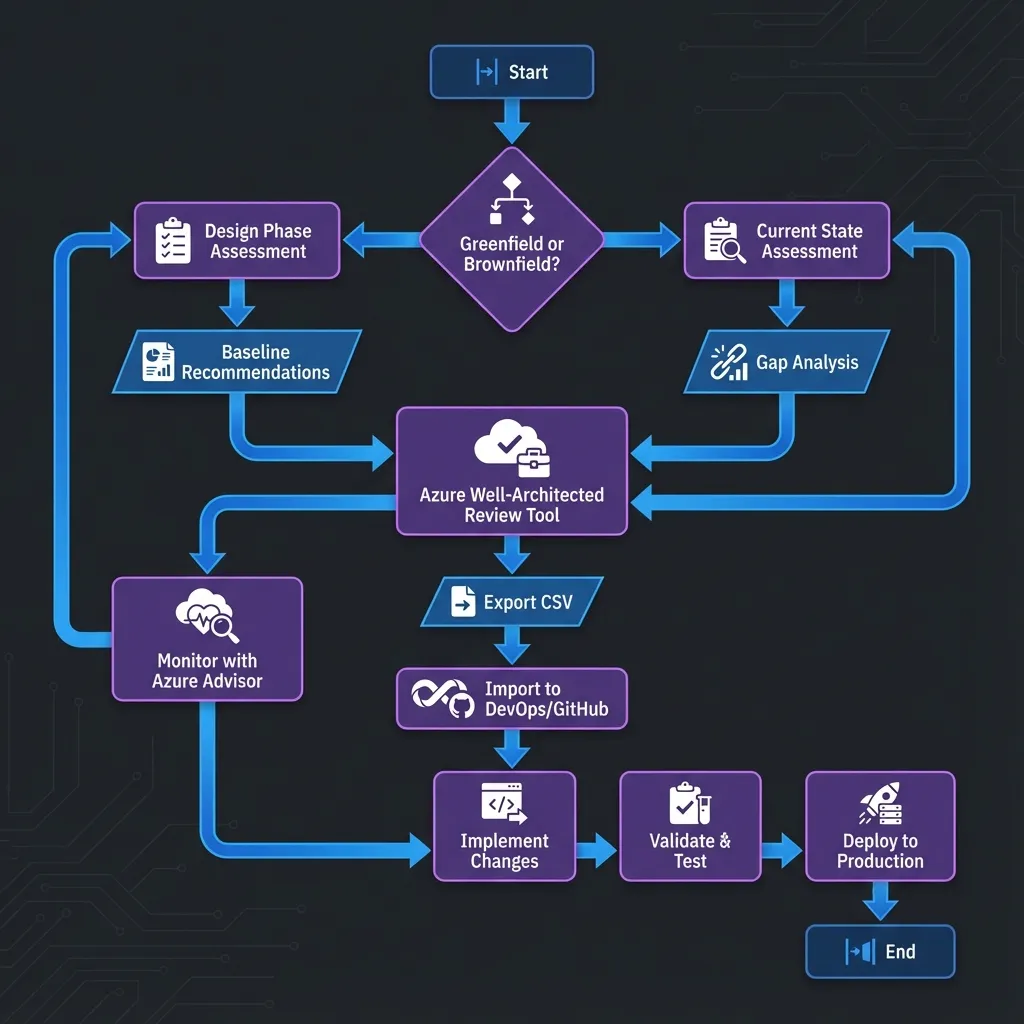
Step 1: Take the Assessment
- Use the Azure Well-Architected Review tool
- Answer 60 questions across all 5 pillars (or focus on one pillar at a time)
- Important: Always sign in to enable milestone tracking
- Choose meaningful assessment and milestone names
Step 2: Receive and Integrate Recommendations
- Export recommendations to CSV from the assessment guidance page
- Share with stakeholders for review and prioritization
- Import into your backlog (Azure DevOps or GitHub) for SDLC integration
- Use DevOps Tooling for WAR Process for automation
Step 3: Prioritize and Implement
- Workload owners and stakeholders prioritize based on business impact
- Factor in applicability and tradeoffs of each recommendation
- Assign owners to specific recommendations
- Track progress through completion as part of standard SDLC
Step 4: Monitor Improvements
- Use milestone feature to track changes over time
- Compare current state against prior milestones
- Monitor Azure Advisor score improvements
- Document lessons learned and update runbooks
Tools and Automation
Leverage Microsoft's comprehensive tools to streamline your Well-Architected Review process.
Azure Review Checklists
The Azure Review Checklists repository provides structured validation:
Available Formats
-
Excel Spreadsheets: Offline review and team collaboration
- Landing Zone Review checklist
- Security Baseline checklist
- Networking Configuration checklist
- Cost Optimization checklist
-
Azure Resource Graph Queries: Automated compliance checking
- Query your environment programmatically
- Identify configuration gaps automatically
- Generate compliance reports
Example: Automated NSG Validation
// Azure Resource Graph query to check NSG rules
Resources
| where type == "microsoft.network/networksecuritygroups"
| extend rules = properties.securityRules
| mv-expand rules
| where rules.properties.access == "Allow"
    and rules.properties.direction == "Inbound"
    and rules.properties.sourceAddressPrefix == "*"
| project name, location, ruleName = rules.name,
    priority = rules.properties.priority
| order by priority asc
Well-Architected Tools
The Well-Architected Tools repository provides automation scripts for:
- DevOps Integration: Import WAR recommendations into Azure DevOps or GitHub
- Backlog Automation: Automatically create work items from assessment CSV
- Tracking: Monitor recommendation implementation progress
- Reporting: Generate compliance and improvement reports
Azure Advisor Integration
Azure Advisor uses the Well-Architected Framework pillars to analyze your resource configuration:
- Automated recommendations: Continuous analysis of your environment
- Azure Advisor Score: Aggregated score across all five pillars
- Prioritization: Focus on actions that yield biggest improvement
- Cost impact: Estimated savings for cost optimization recommendations
Making Recommendations Fundable
Transform technical findings into business-aligned proposals that executives will approve.
The Fundable Recommendation Template
Each recommendation should include:
1. Business Risk Statement
Bad: "No backup for production database"
Good: "Production database has no backup. Data loss would result in 48-72 hours downtime and estimated $500K revenue impact based on Q3 sales data."
2. A/B Options with Cost Deltas
- Option A (Recommended): Azure Backup with 7-day retention + geo-redundant storage
- Monthly cost: $450
- RPO: 24 hours, RTO: 4 hours
- Implementation: 2 weeks
- Option B (Minimum): Azure Backup with 3-day retention + locally redundant storage
- Monthly cost: $180
- RPO: 24 hours, RTO: 8 hours
- Implementation: 1 week
3. 30/60/90 Day Plan
- 30 days: Configure Azure Backup, test restore procedure
- 60 days: Implement geo-redundant storage, document runbooks
- 90 days: Conduct DR drill, validate RTO/RPO targets
Best Practices for Executive Presentations
- Lead with business impact: Revenue risk, compliance violations, security breaches
- Use visuals: Tradeoffs table, risk heat maps, cost comparison charts
- Provide options: Never present a single solution—give choices with clear tradeoffs
- Show quick wins: Highlight low-effort, high-impact items for immediate approval
- Link to strategy: Connect recommendations to business objectives and KPIs