Stop treating cloud governance as a bottleneck. It is your accelerator.
For Enterprise Architects and CTOs, the challenge isn't "how to deploy a VM." It is how to deploy 1,000 resources safely, compliantly, and cost-effectively without slowing down innovation.
Azure Landing Zones are not just a technical implementation—they are the Digital Operational Framework that separates scaling success from "ClickOps" chaos.
The ROI of Boring Governance
Executive Insight: The Cost of Inaction
Without a Landing Zone, organizations typically face a 30-40% "Refactoring Tax" in Year 2, as they dismantle non-compliant, insecure, and sprawling environments. A proper foundation pays for itself in < 6 months through cost avoidance alone.
8 Strategic Design Principles for Leaders
Successful cloud adoption rests on eight non-negotiable architectural pillars. These ensure your environment scales with your business, not against it.
1. Scale Unit Agility
Subscription Democratization: Don't force teams into a shared bucket. Give product teams their own subscriptions as "Scale Units" to decouple their velocity from central IT bottlenecks.
2. Guardrails, Not Gates
Policy-Driven Governance: Move from manual reviews to automated Policy. Developers deploy at speed, while the platform automatically blocks non-compliant resources (e.g., public IPs).
3. Unified Operations
Single Control Plane: Centralize logs and monitoring. Whether it's AKS or VMs, operations teams should see the entire estate through one tailored lens (Azure Monitor).
4. Workload Neutrality
Application-Centric: The platform supports all archetypes—VMs, Containers, or Serverless—without requiring a fundamental redesign for each new tech stack.
5. Zero Trust by Default
Enterprise-Scale Security: Security isn't an afterthought. Identity (PIM), Network (Firewall), and Compliance are baked into the subscription vending process.
6. Automated Reliability
Operational Excellence: Deploy diagnostic settings automatically. Use runbooks to restart unhealthy resources. Human intervention is the exception, not the rule.
7. Business Alignment
Regulatory Reality: The foundation reflects real business needs. If you deal with HIPAA, policy automatically restricts deployments to compliant US regions.
8. Evolutionary Architecture
Modular Design: Start small. Build the Hub and Identity first. Add modules for ExpressRoute or AVS later. Don't build "The Death Star" on day one.
Strategic Warning: The "Cloud Broker" Trap
Common Antipattern: Many IT organizations attempt to "become a cloud provider" by building custom portals that wrap Azure services. This creates a bottleneck where IT must "approve/enable" every new PaaS innovation.
Correct Approach: Don't wrap the cloud; govern it. Give developers direct access to the Azure Portal/API, but wrap them in Identity and Policy Guardrails so they literally cannot deploy non-compliant resources.
Source: Microsoft CAF Antipatterns
Azure Landing Zones are pre-configured environments that provide a secure, scalable foundation for your cloud workloads. They implement Microsoft's Cloud Adoption Framework (CAF) best practices and ensure your Azure environment is ready for enterprise-scale deployments.
Key Components
- Management Groups: Hierarchical organization of subscriptions for policy and access management
- Subscriptions: Logical containers for resources with billing and access boundaries
- Networking: Hub-and-spoke topology with centralized connectivity and security
- Identity: Azure Active Directory integration with RBAC and conditional access
- Governance: Azure Policy for compliance and automated guardrails
- Security: Microsoft Defender for Cloud and security baselines
Pro Tip: Subscription Vending
use a "Subscription Vending Machine" approach (via Bicep/Terraform) to automatically provision new subscriptions with pre-configured networking, Policy assignments, and budget alerts. This prevents "ClickOps" sprawl.
Architecture Patterns
The most common pattern is the Hub-and-Spoke topology, where:
- Hub VNet: Contains shared services like Azure Firewall, VPN Gateway, and ExpressRoute
- Spoke VNets: Isolated workload environments connected to the hub via VNet peering
- Connectivity: Centralized egress/ingress through the hub for security and cost optimization
Design Principles
- Subscription Democratization: Enable teams with dedicated subscriptions while maintaining central governance
- Policy-Driven Governance: Automate compliance through Azure Policy rather than manual processes
- Single Control Plane: Unified management through Azure Resource Manager
- Application-Centric: Design around application needs, not infrastructure constraints
- Azure-Native: Leverage platform services over custom solutions
Policy Example: Enforce Tags
This policy snippet denies resource creation if specific tags are missing, ensuring cost visibility.
{
  "if": {
    "allOf": [
      {
        "field": "tags['CostCenter']",
        "exists": "false"
      },
      {
        "field": "type",
        "equals": "Microsoft.Resources/subscriptions/resourceGroups"
      }
    ]
  },
  "then": {
    "effect": "deny"
  }
}Implementation Best Practices
1. Start with Management Groups
Organize your Azure environment using a clear management group hierarchy:
Root Management Group
├── Platform
│   ├── Management
│   ├── Connectivity
│   └── Identity
└── Landing Zones
    ├── Corp (Internal workloads)
    └── Online (Internet-facing workloads)
Reference Architecture: Hub-and-Spoke Topology
The diagram below illustrates the segmentation strategy. The Hub VNet hosts shared services (Firewall, Bastion, VPN), while spoke VNets host isolated workloads peering back to the Hub.
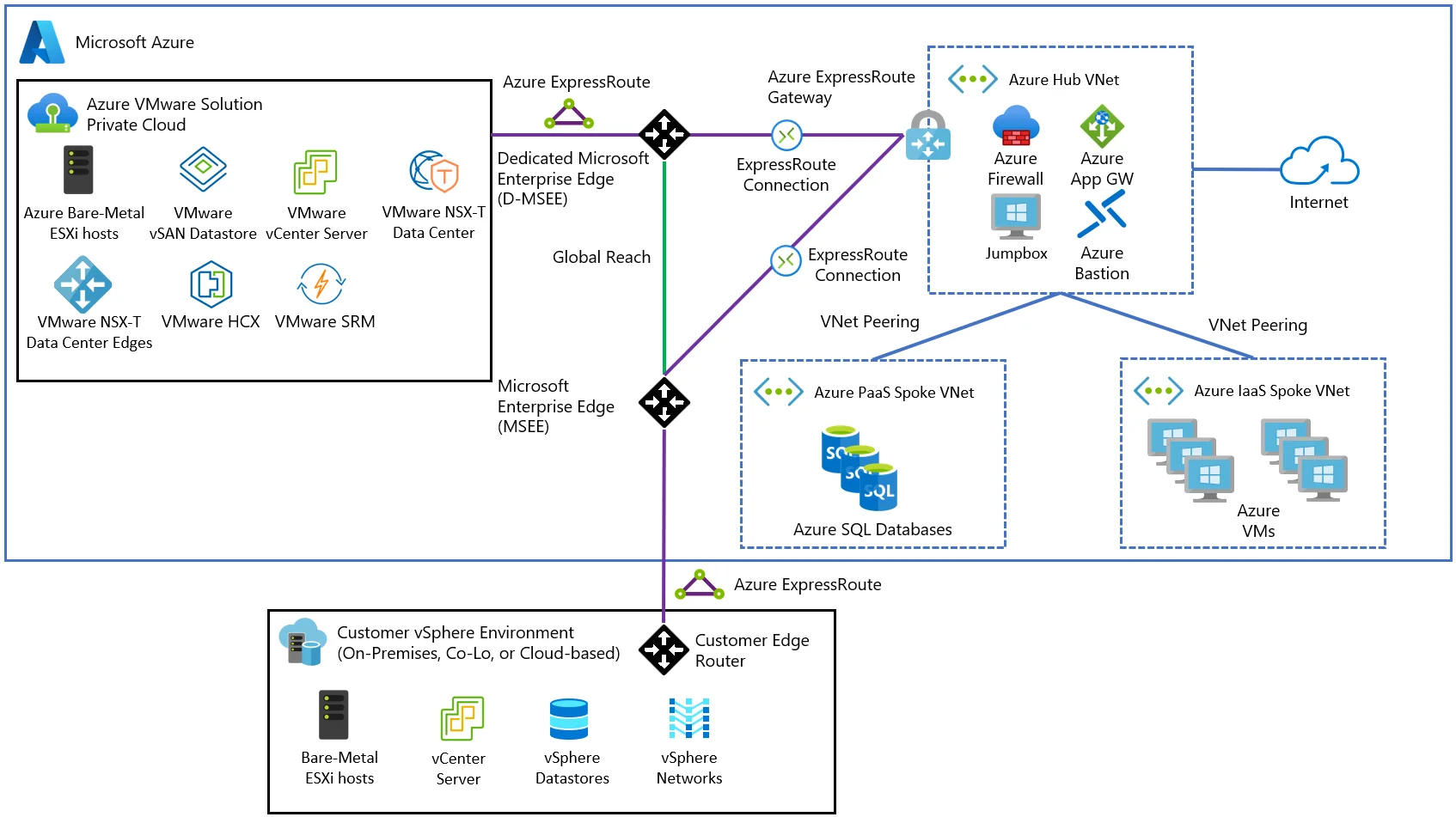
Figure 1: Enterprise Hub-Spoke Topology (Source: Microsoft Architecture Center)
2. Implement Network Segmentation
Use Network Security Groups (NSGs) and Azure Firewall to enforce Zero Trust principles:
- Default deny all traffic
- Explicit allow rules for required communication
- Micro-segmentation between application tiers
- Centralized logging and monitoring
3. Infrastructure as Data: The Certainty Engine
Treating infrastructure as code (Terraform/Bicep) isn't just about speed; it's about auditability. When your entire data center is defined in Git:
- Drift is impossible to hide. If someone manually opens a port, the code pipeline overwrites it or alerts you.
- Disaster Recovery is significantly faster. You can redeploy the entire "control plane" to a new region in minutes, not weeks.
Example: Terraform Project Structure
A modular Terraform structure ensures scalability and component reuse:
.
├── modules/
│   ├── connectivity/    # VNet, VPN, Firewall
│   ├── management/      # Log Analytics, Automation
│   └── identity/        # Role Assignments, Policy
├── landing_zones/
│   ├── corp/           # Internal apps
│   └── online/         # Public apps
└── main.tf             # Orchestration
Security Considerations
Identity and Access Management
- Azure AD Integration: Single sign-on and multi-factor authentication
- RBAC: Principle of least privilege with custom roles
- Managed Identities: Eliminate secrets in application code
- Conditional Access: Context-aware access policies
Data Protection
- Encryption at Rest: Azure Storage Service Encryption with customer-managed keys
- Encryption in Transit: TLS 1.2+ for all communications
- Key Management: Azure Key Vault with HSM backing
- Data Classification: Azure Information Protection labels
Cost Optimization
Landing Zones should include FinOps practices from day one:
- Tagging Strategy: Mandatory tags for cost allocation and chargeback
- Budget Alerts: Proactive notifications before overspending
- Reserved Instances: Commitment-based discounts for predictable workloads
- Auto-Shutdown: Scheduled shutdown of non-production resources
- Right-Sizing: Continuous optimization based on utilization metrics
Practical Implementation Checklist
Interactive Governance Scorecard
Building Azure Landing Zones correctly from the start prevents costly rework and security gaps. This practical checklist, based on real-world implementations, ensures you build a scalable and secure foundation.
🎯 1. Define Business Priorities Before Touching the Portal
Before provisioning anything, work with stakeholders to understand:
- What outcomes matter most: Scalability? Faster go-to-market? Cost optimization?
- What constraints exist: Regulatory standards, data sovereignty, security controls
- What must not break: Legacy integrations, authentication flows, SLAs
This helps prioritize cloud decisions based on value rather than assumption.
🔍 2. The "Brownfield" Reality: Migration Strategy
90% of enterprise implementations are "Brownfield." Leaders often fear that adopting a Landing Zone means pausing migration to rebuild everything. This is a myth.
Strategic Approach: "Vending Machine" Sidecar
- Don't fix the old subscription immediately. Leave it as "Legacy" management group.
- Build the new Landing Zone (Hub + Identity + Governance) in parallel.
- Migrate workloads into new, policy-compliant subscriptions one by one.
Verified Pattern See my GitHub Repository for specific Terraform modules that handle this "parallel build" strategy.
📜 3. Lock Down Governance Early
Set standards from day one to ensure everything downstream is both discoverable and manageable:
- Role-Based Access Control (RBAC): Granular, least-privilege access
- Resource Tagging: Consistent metadata for tracking, automation, and cost management
- Security Baselines: Predefined policies aligned with your compliance model (NIST, CIS, etc.)
🧭 4. Design a Network That Supports Security and Scale
Network configuration should not be an afterthought. This stage sets your network up to scale securely and avoid rework later:
- Define NSG Rules: Enforce segmentation between tiers
- Use Routing Rules: Control traffic flow between network segments
- Consider Private Endpoints: Keep services off the public internet
- Plan for Hybrid Connectivity: VPN Gateway or ExpressRoute for on-premises integration
🧰 5. Choose a Deployment Approach That Fits Your Team
You don't need to reinvent the wheel. Standardizing this step makes every future deployment faster, safer, and reviewable:
- Predefined ARM/Bicep templates: Use Microsoft's reference implementations
- Infrastructure as Code (IaC): Terraform for multi-cloud or complex scenarios
- Custom Provisioning: For unique enterprise requirements
🔐 6. Set Up Identity and Access Controls the Right Way
No shared accounts. No "Owner" access to everyone. This is a critical security layer—set it up with intent:
- Azure Active Directory (AAD): Centralized identity management
- RBAC: Ensure users only have access to what they need, where they need it
- Privileged Identity Management (PIM): Just-in-time access for administrative roles
- Managed Identities: Eliminate secrets in application code
📈 7. Bake in Monitoring and Diagnostics from Day One
Cloud environments must be observable. These tools reduce time to resolution and help enforce SLAs:
- Log Analytics Workspace (LAW): Centralize logs from all resources
- Diagnostic Settings: Capture platform-level signals automatically
- Application Insights: Monitor app health and performance
- Azure Monitor Alerts: Proactive notifications for critical issues
🛡️ 8. Review and Close on Security Posture
Before allowing workloads to go live, conduct a security baseline check. Security is not a phase—it's baked in throughout, but reviewed intentionally before go-live:
- Enable data encryption: At rest and in transit (TLS 1.2+)
- Review Microsoft Defender for Cloud: Apply security recommendations
- Implement Network Security: Azure Firewall, NSGs, and DDoS protection
- Vulnerability Scanning: Regular assessments of deployed resources
🚦 9. Validate Before You Launch
Never skip a readiness review. This keeps surprises out of your production pipeline:
- Deploy in a test environment: Validate templates and policies
- Get sign-off from stakeholders: Architecture, security, and compliance teams
- Track checklist completion: Document all steps before promoting to production
- Conduct disaster recovery drills: Test backup and restore procedures
Common Pitfalls to Avoid
Based on real-world implementations, here are the most common mistakes organizations make:
- No standard tagging: Makes cost allocation and resource management nearly impossible
- No security baseline: Leaves environments vulnerable to attacks
- No network segmentation strategy: Creates flat networks that violate Zero Trust principles
- Inconsistent deployments: Manual provisioning leads to configuration drift
- Skipping governance: Results in sprawl and compliance violations
Conclusion
Azure Landing Zones are not just a technical implementation—they're a strategic enabler for cloud adoption at scale. By establishing a solid foundation with proper governance, security, and cost controls, organizations can accelerate their cloud journey while maintaining compliance and operational excellence.
Interactive: Are You "Ready"?
Use this governance calculator to check if your foundation matches Microsoft Enterprise Scale standards.
Select items to calculate readiness
Azure Landing Zone Design Reviewer
Based on the official Azure Review Checklists, verify your design decisions across critical pillars.
The key to success is starting with a well-architected foundation and continuously evolving it based on organizational needs and Azure platform innovations. Use this practical checklist to ensure you're building Azure right from the start, avoiding the costly rework that comes from rushing into deployments without proper planning.