Mr. Technical Consultant opened the Azure Migrate dashboard for ZionPay Services. 0 apps.
0 servers. And one number that made everything uncertain: 0% performance coverage.
The Cast

Owns discovery, assessment, cutover readiness.

Wants a deck by Friday, clear dates, no surprises.

Owns landing zone and target-state design.

Executes build tasks, needs stable scope inputs.

Wants confidence, risk control, clear next steps.
The Story
Friday’s playback was close.
Mr. Project Manager pinged him first.
“I need the playback deck. I need a wave plan. The customer will ask for dates.”
Mr. Cloud Engineer joined next.
“Give me the build sheet. I will start building.”
Mr. Cloud Architect followed.
“We need to lock the architecture. Hub-spoke. WAF. APIM. Azure Firewall. Private endpoints.”
Then Mr. Customer spoke.
“I don’t want guesses. I want a plan we can trust.”
Mr. Technical Consultant felt the pressure.
He created a new assessment in Azure Migrate.
He hoped it would fix the 48%.
It did not.
MYTH: "New Assessment"
Acts like a "Reset Button" that fixes missing data.
(Click to see Reality)REALITY: "Recalculation"
It's just a new snapshot. It uses the SAME old (incomplete) history.
He paused and asked the question that matters.
“Does a new assessment start from scratch?”
He answered it himself, clearly, because he had checked the facts:
“No. A new assessment is a new snapshot. It recalculates using existing collected
history in the same Azure Migrate project.”
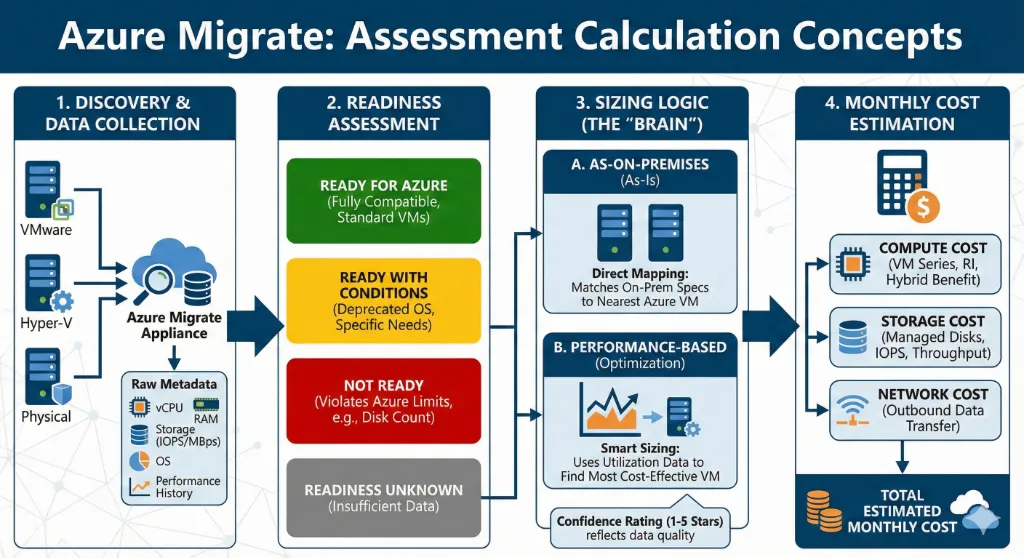
Mr. Cloud Engineer said, “So just create a new assessment every day.”
Mr. Technical Consultant said, “That helps only if new data has been collected. A new assessment cannot invent missing history.”
Mr. Customer asked, “So why is coverage still 48%?”
Mr. Technical Consultant replied in plain words.
“Because many servers do not yet have enough usable performance history. Some are not sending data reliably.
Until that is fixed or enough time passes, coverage stays low.”
Confidence Simulator
Drag the slider to see how "Coverage %" affects Migration Risk.
Mr. Project Manager asked, “What do we tell the client on Friday?”
Mr. Technical Consultant laid down the message.
“We will be direct. We will not over-promise.”
He wrote four bullets for the deck:
- “Scope baseline is confirmed: 0 applications and 0 servers.”
- “Performance coverage is 0% today. That limits sizing and wave confidence.”
- “New assessments recalculate based on collected history. They do not restart data collection.”
- “We have a two-week closure plan to raise coverage and validate dependencies. Then we freeze Wave 1.”
Mr. Cloud Architect asked, “What can we proceed with right now?”
Mr. Technical Consultant answered.
“We proceed with what is safe and foundational. Landing zone, network, security baseline, logging, private
DNS. But we do not lock workload sizing and wave dates for low-confidence apps.”
Mr. Cloud Engineer said, “I will create a new sheet for build inputs.”
Mr. Technical Consultant stopped him.
“No. We already built the master sheet. App profiling. Server scope. App-to-server mapping. That is the
source of truth.”
He added the risk, clearly:
“If we create parallel sheets, we get mismatched server lists, wrong dependencies, and scope drift. That
leads to rework and cutover failures.”
Mr. Customer leaned forward.
“What is the real risk if you proceed with only 48% coverage?”
Mr. Technical Consultant did not soften it.
- Wrong sizing and cost surprises.
- Wrong wave sequencing and longer outages.
- Missed dependencies and failed cutovers.
- Landing zone changes late in the project.
Mr. Project Manager finally had a clean story for Friday.
Mr. Cloud Architect had guardrails.
Mr. Cloud Engineer had a stable input source.
Mr. Customer had transparency and a plan.
Mr. Technical Consultant closed the laptop.
He stopped treating “new assessment” like a reset button.
He treated it like what it is.
A snapshot.
Useful only when the underlying data is real.
And that is how bank migrations stay controlled.
Practical “Mr. Technical Consultant”
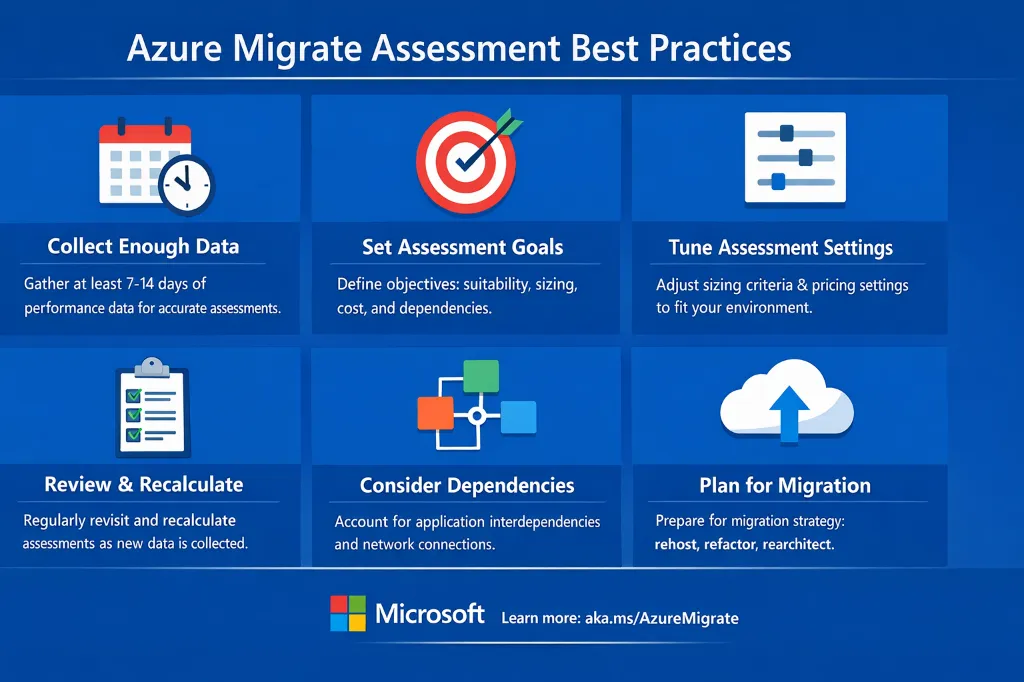
- Stay in the same Azure Migrate project if you want to use existing collected history.
- Recalculate assessments as coverage improves.
- Plan waves by application, not by random VM batches.
- Promote apps to early waves only when dependency confidence is high.
- One master scope sheet. No duplicates.
References
- Azure Migrate: Assessment overview
- Assessment calculations in Azure Migrate
- Create an Azure assessment
- Best practices for creating assessments
- Troubleshoot assessment in Azure Migrate
- Create and manage projects
- Common questions - Discovery and assessment
- Azure Migrate appliance
- Common questions - Azure Migrate appliance
Ready to operationalize your Azure journey?