Architecture is no longer a "stale artifact." It's a living, programmable asset. We are moving from manual "pixel-pushing" to an engineering-first workflow where AI programmatically builds and heals our designs.
Executive Impact Summary
The Era of "Vibe Diagramming"
I’ve spent a large part of my career as an Azure Architect "pixel-pushing"— wrestling with connectors and manually aligning boxes in tools like Visio or Draw.io. But as I look toward leadership roles, I’ve realized we have to stop treating diagrams as one-off, "stale artifacts" that immediately drift from the code they represent.
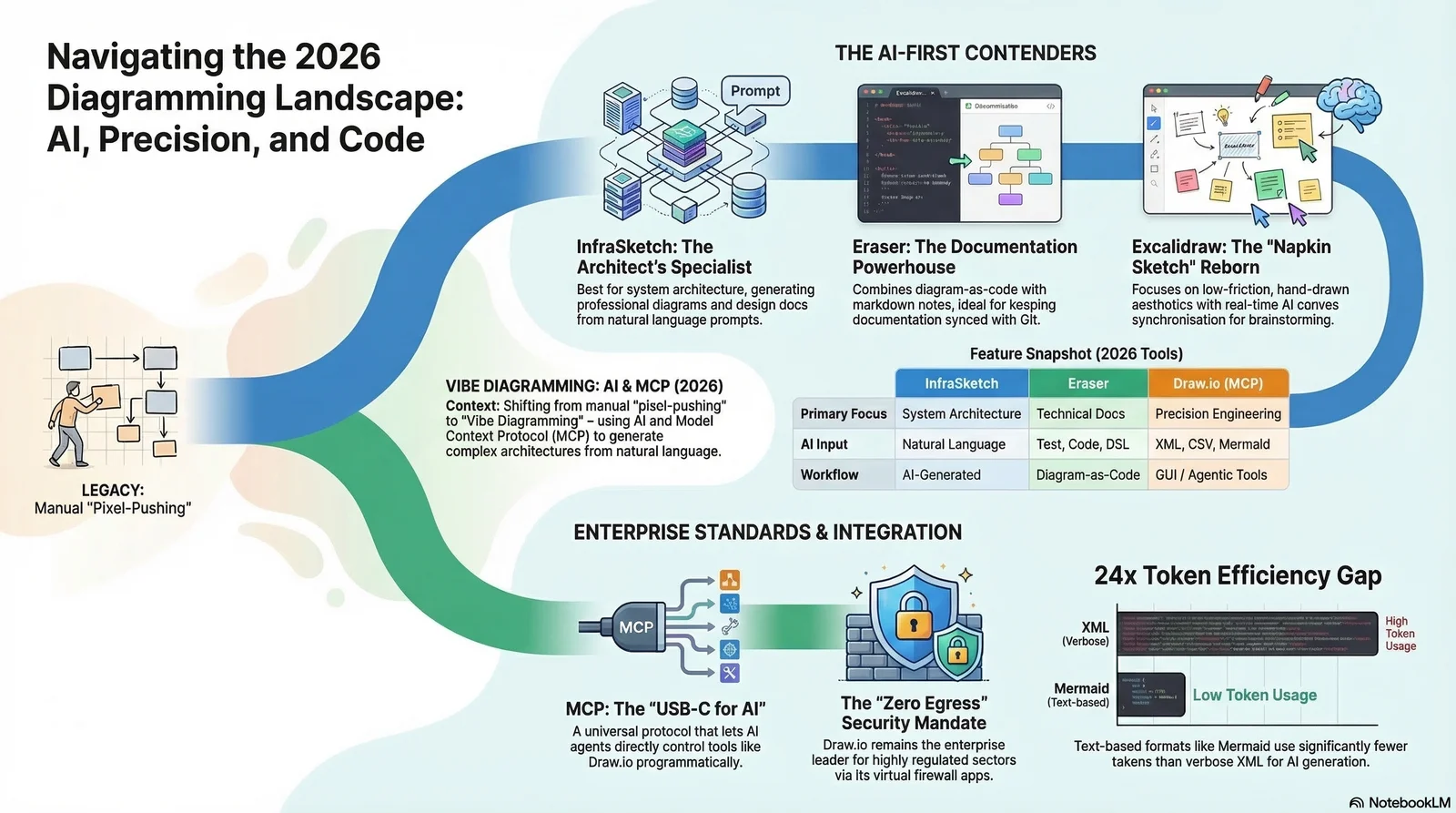
Visualization: The transition from manual "Static Artifacts" to AI-orchestrated "Programmable Assets."
We are entering the era of Vibe Diagramming—a conversational, AI-assisted approach where architecture becomes a living, programmable asset. If you're looking to actually implement this, here is how you move from manual busywork to an engineering-first workflow.
The "USB-C for AI" Moment
The drawio-mcp
server from JGraph (the team behind Draw.io) is effectively the "USB-C for AI" — a
universal interface between LLMs and our engineering tools. It supports XML, CSV, and Mermaid.js formats
with export to .drawio, .webp, .svg, and .pdf.
For those of us leading teams, there are four integration modes — pick the one that fits your setup:
MCP App Server
Renders diagrams inline in chat as interactive iframes via the MCP Apps protocol. No browser tab required.
https://mcp.draw.io/mcp
Hosted
endpoint — zero install
MCP Tool Server
The original server. Opens diagrams in the Draw.io editor via stdio. Supports XML, CSV, and Mermaid with dark mode and lightbox options.
npx @drawio/mcp
Published
on npm
Skill + CLI
A Claude Code skill that writes native .drawio files with optional export to PNG, SVG,
or PDF using --embed-diagram.
Project Instructions
Zero infrastructure. Add instructions to a Claude Project — it generates clickable Draw.io URLs via Python code execution.
The "Tokenomics" of Design
As a leader, I have to weigh the "return on clarity" against the tokenomics of our AI pipelines. Not all formats are equal:
Mermaid.js
The "lightweight" champion. Highest LLM affinity, perfect for rapid internal drafting and brainstorming sessions.
Draw.io XML (mxGraph)
The "fine-dining" option. 24x more verbose, but provides engineering precision for security zones.
Hard-Won Technical Guardrails
If you're setting up the Draw.io MCP server, here are the "non-negotiables" to ensure your generated diagrams don't break:
-
The Double-Hyphen Rule
NEVER use double hyphens (--) inside XML comments. It violates XML specs and will cause parsing errors every time. -
Edge Geometry Requirements
Every edge mxCell must contain an expanded<mxGeometry relative="1" as="geometry" />child element. Self-closing tags simply won't render. -
Parent-Child Containment
Don't just stack shapes. Use proper containment (like Swimlanes for VNets) and ensure children use relative coordinates to their parent.
The Decision Matrix
I use this matrix to guide my teams on which tool to use for specific missions:
Find Your Tool
Not sure which tool fits your workflow? Take this 15-second quiz to get a personalized recommendation:
Diagramming Tool Finder
Answer 3 quick questions to find your ideal match
What is your primary use case?
How important is data sovereignty / zero egress?
What's your team's AI maturity level?
Execution Sequence: The "Programmable" Workflow
Define the Vibe
Use an LLM to draft the high-level architecture in Mermaid.js. Low token cost, maximum creative velocity.
Elevate to Precision
Trigger the drawio-mcp server to convert the draft into detailed mxGraph XML with
pixel-perfect layout.
Apply Governance
Run the "Azure Diagram Agent Skill" to enforce VNet boundaries, official Azure2 icon standards, and regional compliance.
Version & Commit
Save the .drawio file directly to the Git repository alongside your Bicep/Terraform IaC.
Zero drift guaranteed.
Reference Implementation
Theory is valuable, but production-ready code is priceless. For teams looking to operationalize this workflow today, Thomas Thornton's open-source repo provides a battle-tested starting point:
The age of agents as passive code generators is over. The age of agents as tool-wielding collaborators has begun. By treating diagrams as living, version-controlled assets, we bridge the gap between abstract design and concrete implementation.
Ready to operationalize your Azure journey?
Leveraging programmable architecture is a key pillar of the modern Cloud Center of Excellence (CCoE). If you're looking to automate your documentation and reduce technical debt, let's talk.