Executive Impact Summary
The Business Problem
Failure Exposure
Assuming "multi-region" means automatic failover for AI workflows leaves enterprises exposed. When a primary region degrades, untested DR patterns cause prolonged outages, risking partner integrations and revenue.
The Strategic Play
Zero-Trust Routing
A zero-trust, landing-zone-aligned DR architecture using APIM Standard v2 twin instances, isolated Azure AI Search replication, and explicit DNS/Gateway failover routing across cross-geography regions.
The Executive ROI
Mitigated Risk
Reduced RTO from undefined days to tested minutes. Mitigated regional failure risks while securing SLA retention for mission-critical AI APIs across the Middle East and Europe.
The Scenario: Why this is harder than it looks
Imagine an enterprise platform serving mobile apps, partner integrations, internal business systems, and AI-assisted workflows across the Middle East. The primary region is UAE North. It leverages Azure API Management (APIM) as the gateway tier, intertwined with Azure AI Search, Document Intelligence, and Azure AI Foundry endpoints.
The business mandates a strict disaster recovery design extending into Sweden Central. Simple geography, right? Wrong. The first issue is tier reality. APIM does not support identical DR mechanisms across its versions.
The second issue is service behavior. Generative AI endpoint availability and failure patterns do not mirror traditional IaaS configurations. And the third issue? UAE North to Sweden Central is an explicitly non-paired cross-geography DR design.
If you assume an active passive pattern is just a simple "networking flip", then your architecture looks fine in presentation slides, but completely fails under system pressure.
The First Hard Truth: APIM Tiers Matter
Microsoft’s reliability SLA is clear, yet often glossed over. Not every tier of APIM natively supports multi-region routing. Here is the operational reality check you need before finalizing any topology:
- Premium classic supports native multi-region deployment. But remember, this propagates gateway proxies, not isolated backup environments.
- Premium v2 supports availability zones, but it entirely lacks multi-region deployments. Worse yet, as of current mappings, it is not even available in UAE North. Designing around a non-supported tier is an amateur mistake.
- Standard v2 supports neither out-of-the-box.
APIM Tier Comparison: DR Feature Matrix
Source: Azure APIM Feature Comparison
| Feature | Consumption | Developer | Basic v2 | Standard | Standard v2 ★ | Premium | Premium V2 |
|---|---|---|---|---|---|---|---|
| SLA | 99.95% | 99.95% | 99.95% | 99.95% | 99.99% | 99.99% | |
| Max Scale-out | N/A | 1 | 10 | 4 | 10 | 10/region | 30 |
| VNet Support | ⓘ | ⓘ | ⓘ | ||||
| Multi-Region Deploy | |||||||
| Self-hosted Gateway | ⓘ | ⓘ | |||||
| Custom Domain Names | |||||||
| Developer Portal | |||||||
| Cache | External | 10 MB | 250 MB/region | 1 GB/unit | 1 GB/unit | 5 GB/unit | 5 GB/unit |
| Entra ID in Portal | |||||||
| DR Verdict | NOT VIABLE | DEV ONLY | NO VNET | LEGACY | RECOMMENDED | NATIVE DR | NO UAE ⚠️ |
Scroll horizontally on mobile to view all tiers. ★ = Recommended for this DR scenario.
If UAE North must remain the primary region and you demand the updated platform, Standard v2 is your baseline. However, this means two explicitly standalone instances—aligned purely via APIOps and IaC. You are engineering the recovery, not toggling a magic platform feature.
Designing DR for AI Services
When engineering AI into your DR posture, you must stop treating AI like a static web app. Here is how you decompose the dependencies:
Azure AI Search — DR & Backup Engineering
First principle: Azure AI Search is explicitly not a primary data store. Microsoft does not provide native backup/restore or automatic cross-region replication. You own the DR story end-to-end. If your primary index corrupts and your secondary blindly mirrors it, you don’t have DR — you have a fast multi-continent outage.
Multi-Region Architecture Pattern
Deploy two completely independent AI Search services — one in UAE North, one in Sweden Central. Both services must run the same indexer pipeline against a geo-replicated source (Blob Storage with GRS/GZRS, or Cosmos DB with multi-region writes).
The indexer in the secondary region runs on its own schedule and is independently queryable at all times (warm standby, not cold restore).
# Deploy AI Search service in UAE North
az search service create \
  --name srch-uae-prod \
  --resource-group rg-ai-uae-prod \
  --location uaenorth \
  --sku Standard \
  --replica-count 2 \
  --partition-count 2

# Deploy identical service in Sweden Central (DR)
az search service create \
  --name srch-sweden-dr \
  --resource-group rg-ai-sweden-dr \
  --location swedencentral \
  --sku Standard \
  --replica-count 2 \
  --partition-count 2
Index Synchronisation Strategy
| Pattern | How it Works | RPO | When to Use |
|---|---|---|---|
| Dual-indexer (recommended) | Both regions run indexers against same GRS source. Indexer schedule: every 5 min. | ~5 min | Production AI Search for RAG workloads |
| Push via REST API | Application code pushes document updates to both endpoints simultaneously via Search REST API. | <1 min | Real-time inventory, trading, live data |
| Scheduled full re-index | Nightly full rebuild of secondary from source. Simple but slow recovery. | Up to 24 hrs | Static content / large indexes with low update frequency |
Critical: When the secondary indexer reads from the same GRS Blob Storage account, failover to the secondary storage endpoint must be pre-tested. A corrupted primary document will re-index into both regions. Always maintain a time-delayed snapshot of source documents (e.g., Azure Blob Lifecycle Policy archiving to Cool tier after 7 days) as your true backup layer.
Front Door Health Probe Configuration for Automatic Failover
// Front Door Origin Group — AI Search Failover
{
  "originGroup": "ai-search-origins",
  "healthProbe": {
    "path": "/indexes?api-version=2023-11-01",
    "protocol": "Https",
    "intervalInSeconds": 30,
    "healthProbeMethod": "HEAD"
  },
  "loadBalancingSettings": {
    "sampleSize": 4,
    "successfulSamplesRequired": 2,
    "additionalLatencyInMilliseconds": 0
  },
  "origins": [
    { "hostname": "srch-uae-prod.search.windows.net",    "priority": 1, "weight": 1000 },
    { "hostname": "srch-sweden-dr.search.windows.net",   "priority": 2, "weight": 1000 }
  ]
}
Private Endpoint Note: In a private-endpoint deployment, the Front Door health probe cannot reach AI Search directly. Use a lightweight Azure Function Health Checker in each region that probes the Search service over private link and exposes a public /health endpoint — Front Door probes the function, not Search directly.
Hands-On Labs & Official References — Azure AI Search DR
Azure Document Intelligence — DR & Backup Engineering
Architecture reality: Azure Document Intelligence is a regional resource. There is no built-in cross-region failover toggle. DR requires deploying at minimum two separate resources — one per region — and using the Model Copy API to replicate custom models and classifiers. Out-of-the-box prebuilt models (Invoice, Receipt, Layout) are available in all regions and need no copy.
Model Copy API — Step-by-Step Runbook
The Copy API is a two-phase operation: authorize on target, then initiate copy from source. Both the source and target resources must use the same pricing tier (S0). The copy is asynchronous — poll the operation URL until status is succeeded.
# Step 1: Authorize copy on TARGET (Sweden Central) — generates an authorization token
TARGET_ENDPOINT="https://docintel-sweden-dr.cognitiveservices.azure.com"
TARGET_KEY="<sweden-dr-api-key>"
MODEL_ID="my-custom-invoice-classifier"

AUTHORIZATION=$(curl -s -X POST \
  "${TARGET_ENDPOINT}/documentintelligence/documentModels/${MODEL_ID}:authorizeCopy?api-version=2024-02-29-preview" \
  -H "Ocp-Apim-Subscription-Key: ${TARGET_KEY}" \
  -H "Content-Type: application/json" \
  -d ‘{"modelId": "’"${MODEL_ID}"’"}’)

echo "Authorization token: ${AUTHORIZATION}"

# Step 2: Initiate copy FROM SOURCE (UAE North)
SOURCE_ENDPOINT="https://docintel-uae-prod.cognitiveservices.azure.com"
SOURCE_KEY="<uae-prod-api-key>"

OPERATION_URL=$(curl -s -D - -o /dev/null -X POST \
  "${SOURCE_ENDPOINT}/documentintelligence/documentModels/${MODEL_ID}:copyTo?api-version=2024-02-29-preview" \
  -H "Ocp-Apim-Subscription-Key: ${SOURCE_KEY}" \
  -H "Content-Type: application/json" \
  -d "${AUTHORIZATION}" | grep -i ‘operation-location’ | tr -d ‘\r’ | cut -d’ ‘ -f2)

echo "Polling: ${OPERATION_URL}"

# Step 3: Poll until succeeded
while true; do
  STATUS=$(curl -s "${OPERATION_URL}" -H "Ocp-Apim-Subscription-Key: ${SOURCE_KEY}" | python3 -c "import sys,json; print(json.load(sys.stdin)[‘status’])")
  echo "Status: ${STATUS}"
  [[ "${STATUS}" == "succeeded" || "${STATUS}" == "failed" ]] && break
  sleep 10
done
Automated Daily Model Sync Pipeline
Wrap the above script into an Azure Logic App or Azure DevOps pipeline scheduled daily. For each model/classifier in the source resource, invoke the Copy API to the DR target. The pipeline should:
- List all custom models from UAE North using
GET /documentintelligence/documentModels?api-version=2024-02-29-preview - For each model, check if Sweden Central version’s
lastUpdatedDateTimeis older than source — only copy if stale - Send a Teams/email alert on copy failure so engineers can manually intervene before the next potential DR event
Zero-Trust Secret Management: Each regional Document Intelligence resource must have its own separate Key Vault in the same region. Cross-region Key Vault lookups during a DR event create a latency and availability dependency chain. Store both API keys in UAE North KV and Sweden Central KV independently. APIM Named Values must point to the local regional KV reference — not a shared cross-region KV.
Hands-On Labs & Official References — Azure Document Intelligence DR
Azure AI Foundry & Model Endpoints — DR & Backup Engineering
The hard constraint that kills most DR plans: Azure AI Foundry provides no automatic failover. PTU (Provisioned Throughput Units) cannot be auto-spun in a secondary region under duress. You must pre-allocate PTU capacity in Sweden Central before you need it. Assuming you can spin up PTU during a sev-1 at 3 AM is a fast track to an executive-level outage post-mortem.
PTU Pre-Allocation Strategy
There are two distinct PTU purchase patterns for DR. The right choice depends on your budget and RTO tolerance:
| Pattern | UAE North (Primary) | Sweden Central (DR) | Cost Implication | RTO |
|---|---|---|---|---|
| Active-Active PTU | Full PTU allocation (e.g., 100 PTU) | Full PTU allocation (100 PTU) | 2× PTU cost always | ~5 min (Front Door reroute) |
| Workload + Enterprise Pool (recommended) | Workload PTU (dedicated, 100 PTU) | Enterprise Data Zone PTU pool (shared, shared across projects) | ~40–60% cost saving on DR region | 15–20 min (pool allocation request) |
| PTU Primary + PAYG DR | PTU (100 PTU) | Standard (PAYG) — no pre-purchase | Lowest cost | 45–90 min + throttle risk during event |
Agent State Backup — Cosmos DB Configuration
Azure AI Foundry Agent Service stores conversation threads, tool call history, and agent configuration in a customer-provisioned Azure Cosmos DB account. This is the only stateful component of the AI Foundry stack. If you skip this, your agents lose all session context on failover.
# Configure Cosmos DB for AI Foundry Agent Service with multi-region writes
az cosmosdb create \
  --name cosmos-agents-prod \
  --resource-group rg-ai-uae-prod \
  --locations regionName="UAE North" failoverPriority=0 isZoneRedundant=true \
  --locations regionName="Sweden Central" failoverPriority=1 isZoneRedundant=false \
  --enable-multiple-write-locations true \
  --default-consistency-level Session \
  --backup-policy-type Continuous \
  --continuous-mode-backup-interval 240

# Link Cosmos DB to AI Foundry Project during hub creation
az ml workspace create \
  --name ai-foundry-uae-hub \
  --resource-group rg-ai-uae-prod \
  --location uaenorth \
  --kind hub \
  --cosmos-db-id "/subscriptions/<sub-id>/resourceGroups/rg-ai-uae-prod/providers/Microsoft.DocumentDB/databaseAccounts/cosmos-agents-prod"
Model Deployment Parity via Bicep
Model deployments in AI Foundry are configuration objects — there is no "copy API." The only safe DR approach is to manage them as Infrastructure as Code and maintain identical deployment manifests for both regions:
// Bicep: Deploy identical GPT-4o deployment in both regions
param location string
param hubName string

resource aiFoundryHub ‘Microsoft.MachineLearningServices/workspaces@2024-04-01’ existing = {
  name: hubName
}

resource gpt4oDeployment ‘Microsoft.CognitiveServices/accounts/deployments@2023-10-01-preview’ = {
  name: ‘${hubName}/gpt-4o-deployment’
  properties: {
    model: {
      format: ‘OpenAI’
      name: ‘gpt-4o’
      version: ‘2024-05-13’
    }
    scaleSettings: {
      scaleType: ‘Standard’  // Switch to ‘ProvisionedManaged’ for PTU
      capacity: 10
    }
  }
}

// Run with: az deployment group create --template-file ai-foundry.bicep \
//   --parameters location=uaenorth hubName=ai-foundry-uae-hub
// Run with: az deployment group create --template-file ai-foundry.bicep \
//   --parameters location=swedencentral hubName=ai-foundry-sweden-hub
DR Runbook — AI Foundry Failover Sequence:
- Detect: Azure Monitor alert fires on
SuccessRate < 95%on UAE North AI Foundry endpoint for >5 minutes - Validate: Run synthetic test against Sweden Central AI Foundry endpoint — confirm model responds correctly
- Switch: Update Front Door origin weights (UAE=0, Sweden=1000) or disable UAE origin entirely
- APIM: Verify Named Values (
ai-foundry-endpoint) point to Sweden Central — update via APIOps if not already parameterized - Cosmos DB: Trigger manual failover if UAE North Cosmos region is also unavailable:
az cosmosdb failover-priority-change --name cosmos-agents-prod --failover-policies "Sweden Central=0" "UAE North=1" - Notify: Alert on-call + stakeholders, open sev-1 bridge
Hands-On Labs & Official References — Azure AI Foundry DR
Azure API Management — Backup, Restore & DR Engineering
APIM DR architecture decision: Standard v2 in UAE North + Standard v2 in Sweden Central means two completely independent instances. Microsoft provides a native Backup/Restore REST API to export and import service configuration. The critical insight: backup captures configuration, not traffic state. Your DR posture is a combination of regular backups + APIOps pipeline for config parity + Front Door for traffic routing.
APIM Backup REST API — Automated Hourly Schedule
The Backup API exports APIs, products, subscriptions, policies, named values, users, groups, and certificates to an Azure Storage blob. Always backup to a geo-redundant storage account (GRS or GZRS) so the backup blob is available even if the primary region is down.
# Automated APIM Backup using Azure CLI + REST API
SUBSCRIPTION_ID="<your-subscription-id>"
RESOURCE_GROUP="rg-apim-uae-prod"
APIM_NAME="apim-uae-prod"
STORAGE_ACCOUNT="stbackupapim"   # GRS storage account
STORAGE_CONTAINER="apim-backups"
BACKUP_NAME="apim-uae-$(date +%Y%m%d-%H%M)"
STORAGE_KEY=$(az storage account keys list --account-name ${STORAGE_ACCOUNT} --query ‘[0].value’ -o tsv)

# Trigger backup via ARM REST API
az rest --method post \
  --url "https://management.azure.com/subscriptions/${SUBSCRIPTION_ID}/resourceGroups/${RESOURCE_GROUP}/providers/Microsoft.ApiManagement/service/${APIM_NAME}/backup?api-version=2022-08-01" \
  --body "{
    \"storageAccount\": \"${STORAGE_ACCOUNT}\",
    \"containerName\": \"${STORAGE_CONTAINER}\",
    \"backupName\": \"${BACKUP_NAME}\",
    \"accessType\": \"StorageAccessKey\",
    \"accessKey\": \"${STORAGE_KEY}\"
  }"

echo "Backup initiated: ${BACKUP_NAME}"
echo "Poll: az apim show --name ${APIM_NAME} --resource-group ${RESOURCE_GROUP} --query ‘provisioningState’  (wait for ‘Succeeded’)"
APIM Restore to DR Instance
# Restore backup to Sweden Central APIM instance
DR_RESOURCE_GROUP="rg-apim-sweden-dr"
DR_APIM_NAME="apim-sweden-dr"
BACKUP_NAME="apim-uae-20260418-0300"  # Target specific backup snapshot

az rest --method post \
  --url "https://management.azure.com/subscriptions/${SUBSCRIPTION_ID}/resourceGroups/${DR_RESOURCE_GROUP}/providers/Microsoft.ApiManagement/service/${DR_APIM_NAME}/restore?api-version=2022-08-01" \
  --body "{
    \"storageAccount\": \"${STORAGE_ACCOUNT}\",
    \"containerName\": \"${STORAGE_CONTAINER}\",
    \"backupName\": \"${BACKUP_NAME}\",
    \"accessType\": \"StorageAccessKey\",
    \"accessKey\": \"${STORAGE_KEY}\"
  }"

# Limitations: Restore overwrites target configuration entirely.
# Named Values pointing to UAEspecific Key Vault refs need post-restore re-pointing.
# Always run APIOps publisher AFTER restore to re-apply environment-specific Named Values.
What APIM Backup Does NOT Include:
- Custom gateway certificates — store in Key Vault and re-bind post-restore
- Named Values that reference Key Vault secrets — KV references need separate regional KV setup
- Analytics data and logs — these live in Azure Monitor / Application Insights, not in APIM
- Identity provider configuration secrets — re-configure OAuth app secrets post-restore
APIOps Pipeline for Continuous Config Parity
Backup + restore is a recovery tool, not a sync tool. For continuous parity between UAE North and Sweden Central APIM instances, configure an APIOps extractor/publisher pipeline that runs on every merge to main:
# azure-pipelines-apiops.yml (abbreviated)
trigger:
  branches:
    include: [ main ]

stages:
- stage: ExtractUAE
  jobs:
  - job: Extract
    steps:
    - task: AzureCLI@2
      displayName: ‘Extract APIM config from UAE North’
      inputs:
        scriptType: bash
        scriptLocation: inlineScript
        inlineScript: |
          # APIOps extractor pulls APIs, policies, named values
          ./extractor/run.sh \
            --apimServiceName apim-uae-prod \
            --resourceGroupName rg-apim-uae-prod \
            --apiSpecificationFormat OpenApiJson \
            --outputFolder $(Build.ArtifactStagingDirectory)/apim-config

- stage: PublishSweden
  dependsOn: ExtractUAE
  condition: succeeded()
  jobs:
  - job: Publish
    steps:
    - task: AzureCLI@2
      displayName: ‘Publish extracted config to Sweden Central’
      inputs:
        scriptType: bash
        scriptLocation: inlineScript
        inlineScript: |
          # Publisher deploys extracted config to Sweden DR instance
          ./publisher/run.sh \
            --apimServiceName apim-sweden-dr \
            --resourceGroupName rg-apim-sweden-dr \
            --configFile $(Build.ArtifactStagingDirectory)/apim-config/configuration.yaml \
            --overrideNamedValues "ai-foundry-endpoint=$(SWEDEN_AI_ENDPOINT)" \
                                  "ai-search-endpoint=$(SWEDEN_SEARCH_ENDPOINT)"
Key insight on Named Value overrides: The --overrideNamedValues flag in the publisher is what allows the same extracted APIM configuration to deploy to two different regions pointing to region-specific backend endpoints. This is the mechanism that eliminates manual post-restore reconfiguration. Without this, the Sweden DR APIM will point all its policies to UAE North backends — a silent failure that only reveals itself during an actual DR event.
Hands-On Labs & Official References — Azure APIM Backup & DR
Enterprise Landing Zone Engineering
We do not dump these systems into disparate resource groups. We design them into an aligned Azure Landing Zone utilizing a strict hub-and-spoke pattern:
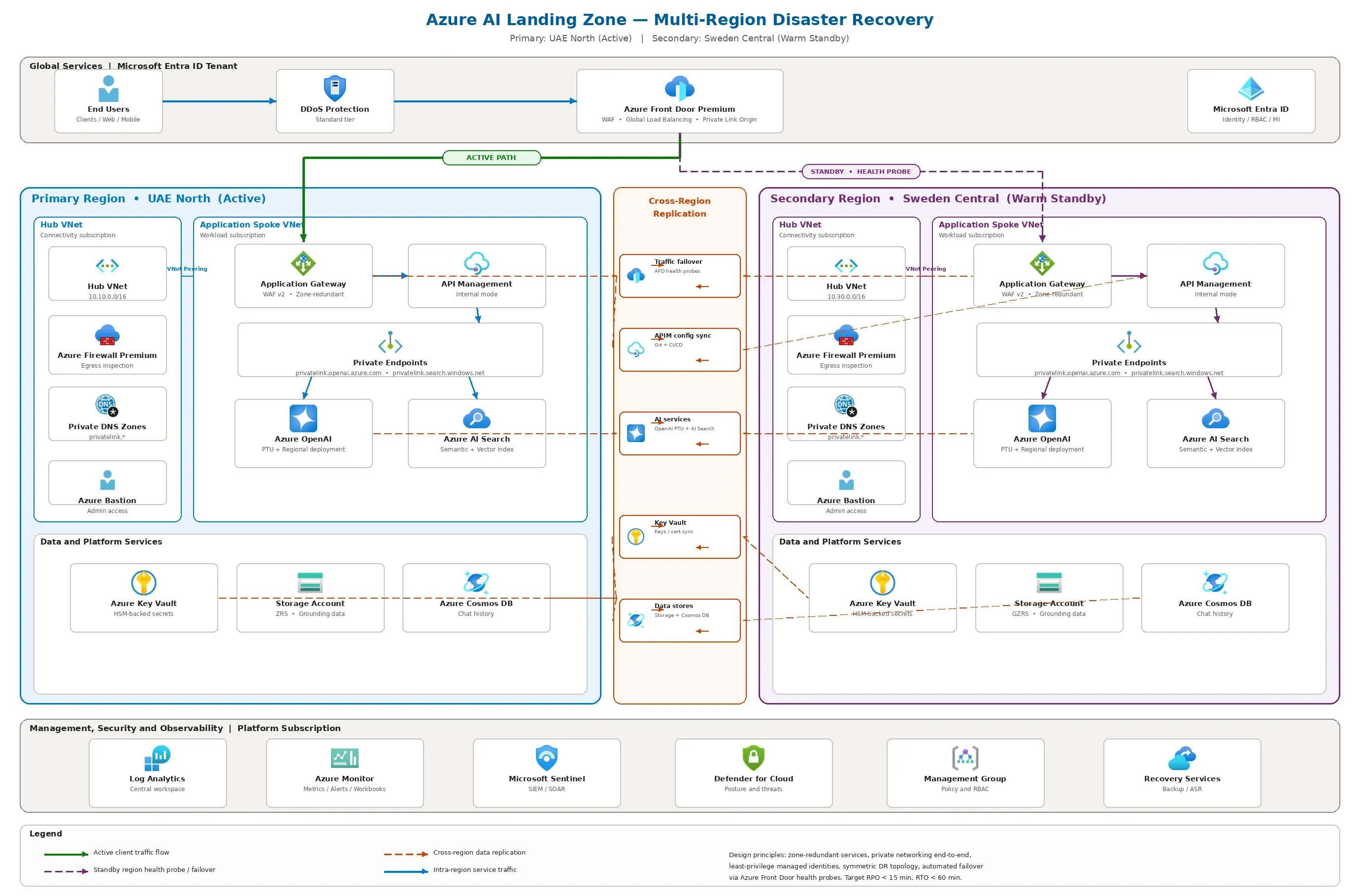
Figure 1: Complete Zero-Trust DR Architecture across UAE North and Sweden Central (Click diagram to expand)
The Architectural Verification Sequence
APIM DR Alternatives at a Glance
| Tier | Native Platform Mechanism | Architectural Burden | My Recommendation |
|---|---|---|---|
| Standard v2 | Modern scaling across UAE and Sweden independently. | Total customer-owned DR routing, config parity, failover runbooks via APIOps. | Recommended if UAE primary & v2 alignment are strict requirements. |
| Premium classic | Built-in multi-region gateway propagation. | Testing governance, managing complex rollbacks globally. | Recommended if "native multi-region" APIM drives board approval. |
| Premium v2 | Availability Zones in selected geographies. | Massive constraint: Not deployable in UAE North today. | Reject outright for this exact scenario. |
Engineer's Runbook: Deploying the DR Pattern
Transitioning from presentation slides to actual Terraform or Bicep requires specific engineering execution. If you are the Cloud Engineer tasked directly with deploying this architecture, here is exactly how you execute the landing zone setup:
1. Decoupling Infrastructure from API Governance (APIOps)
Because Standard v2 APIM instances are entirely independent, manually recreating APIs in Sweden Central will lead to configuration drift and inevitable outage during failover. You must isolate the core architecture deployment from the API policy lifecycle.
The Rule: Deploy the APIM infrastructure shells via parameterized Bicep/Terraform (main.bicep with var.uae and var.sweden). Then, establish an Azure APIOps pipeline. The APIOps extractor pulls API designs, named values, and policies from UAE North and the publisher deploys them immutably to Sweden Central.
2. Azure Front Door Priority Origin Generation
You cannot use a simple Active/Passive traffic manager. You must configure Azure Front Door with strict origin priorities to ensure Sweden Central only receives health-probe traffic until the UAE North origin group drops below acceptable health thresholds.
// Bicep: Azure Front Door Origin Routing Logic
resource originGroup 'Microsoft.Cdn/profiles/originGroups@2023-05-01' = {
  name: 'dr-origin-group'
  parent: frontDoorProfile
  properties: {
    loadBalancingSettings: {
      sampleSize: 4
      successfulSamplesRequired: 3
    }
    healthProbeSettings: {
      probePath: '/status-0123456789abcdef' // Secure APIM health probe URL
      probeProtocol: 'Https'
      probeIntervalInSeconds: 60 // Keep intervals longer to reduce backend load
    }
  }
}

// UAE North - Active
resource uaeOrigin 'Microsoft.Cdn/profiles/originGroups/origins@2023-05-01' = {
  name: 'uae-appgw-origin'
  parent: originGroup
  properties: {
    hostName: uaeAppGatewayFQDN
    priority: 1    // Traffic defaults here
    weight: 1000
  }
}

// Sweden Central - Standby
resource swedenOrigin 'Microsoft.Cdn/profiles/originGroups/origins@2023-05-01' = {
  name: 'sweden-appgw-origin'
  parent: originGroup
  properties: {
    hostName: swedenAppGatewayFQDN
    priority: 2    // Activated on Priority 1 failure
    weight: 1000
  }
}
Front Door + APIM Origin Lockdown Pattern
A critical hardening step most architects skip: ensuring that your APIM instances only accept traffic routed through Azure Front Door, not direct public internet hits.
The Azure Quickstart Template: Front Door Standard/Premium with API Management provides the canonical reference for this pattern. Here is how you engineer it into each regional APIM instance:
The Nightclub Bouncer Analogy
Think of Azure Front Door as the only legitimate entrance to your nightclub (APIM). The NSG is the velvet rope that blocks anyone who tries to sneak in through the kitchen door. The global APIM policy is the bouncer inside who checks every guest's VIP wristband (X-Azure-FDID header) to make sure they actually came through the front entrance—and didn't just forge a ticket.
Step 1: NSG — Block All Non-Front-Door Ingress
Deploy a Network Security Group on the APIM subnet that only allows inbound HTTPS from the AzureFrontDoor.Backend service tag. This physically prevents any internet user from hitting APIM's public IP directly, even if they discover it.
// NSG Rule: Allow ONLY Azure Front Door backend traffic
resource nsg 'Microsoft.Network/networkSecurityGroups@2023-05-01' = {
  name: 'nsg-apim-${regionSuffix}'
  location: location
  properties: {
    securityRules: [
      {
        name: 'AllowFrontDoorInbound'
        properties: {
          priority: 100
          direction: 'Inbound'
          access: 'Allow'
          protocol: 'Tcp'
          sourcePortRange: '*'
          destinationPortRange: '443'
          sourceAddressPrefix: 'AzureFrontDoor.Backend'
          destinationAddressPrefix: 'VirtualNetwork'
        }
      }
      {
        name: 'AllowAPIMManagement'
        properties: {
          priority: 110
          direction: 'Inbound'
          access: 'Allow'
          protocol: 'Tcp'
          sourcePortRange: '*'
          destinationPortRange: '3443'
          sourceAddressPrefix: 'ApiManagement'
          destinationAddressPrefix: 'VirtualNetwork'
        }
      }
      {
        name: 'DenyAllOtherInbound'
        properties: {
          priority: 4096
          direction: 'Inbound'
          access: 'Deny'
          protocol: '*'
          sourcePortRange: '*'
          destinationPortRange: '*'
          sourceAddressPrefix: '*'
          destinationAddressPrefix: '*'
        }
      }
    ]
  }
}
Step 2: Global APIM Policy — Validate the X-Azure-FDID Header
NSG rules alone are necessary but not sufficient. The AzureFrontDoor.Backend service tag permits traffic from any Front Door instance globally. To ensure requests originate from your specific Front Door profile, you must inject a global inbound policy that validates the X-Azure-FDID header against your Front Door's unique ID:
<!-- Global APIM Policy: Validate Front Door ID -->
<policies>
  <inbound>
    <base />
    <check-header name="X-Azure-FDID"
                  failed-check-httpcode="403"
                  failed-check-error-message="Invalid Front Door ID"
                  ignore-case="false">
      <value>{{front-door-id}}</value>
    </check-header>
  </inbound>
</policies>
DR-Critical Note:
Store the Front Door ID as a Named Value in each regional APIM instance (e.g., front-door-id). Your APIOps pipeline must propagate this value identically to both UAE North and Sweden Central instances. If the Sweden Central APIM has a stale or missing Front Door ID, every request will return 403 during failover — defeating the entire DR exercise.
Step 3: Apply to Both Regions via APIOps
This lockdown must be identical in both regions. The APIOps extractor/publisher pipeline you built in Step 1 of the deployment runbook must include:
- Named Values: Specifically
front-door-id— extracted from UAE North and published to Sweden Central. - Global Policy XML: The
check-headerpolicy above must live in the all-APIs policy scope, not per-API. This is non-negotiable. - NSG Terraform/Bicep modules: Parameterized per region (
var.uae,var.sweden) so NSG rules deploy alongside each APIM subnet.
Why This Matters for DR
Without this pattern, a direct-to-APIM attack during a region failover can bypass Front Door's WAF, DDoS protection, and health-probe routing entirely — eliminating every layer of your DR investment. The NSG + header validation combination creates defense-in-depth that survives region cutovers because it's baked into each standalone APIM instance's infrastructure and policy layer.
3. Private Endpoint & Hub DNS Wiring
A fatal multi-region mistake is failing to isolate DNS resolution. If APIM in Sweden Central attempts to resolve my-ai-search.privatelink.search.windows.net and it resolves to the dead UAE North private IP, the failover collapses.
- The Fix: Do not link the global Hub VNet Private DNS Zone statically. Use Azure Private DNS Virtual Network Links localized per region if possible, or leverage Azure Firewall DNS proxies as forwarders.
- Configure APIM networking to explicitly point its custom DNS setting to the local regional subset (or local Azure Firewall IP acting as DNS proxy) so that the exact same AI Search
privatelinkURL resolves to the local Sweden Central endpoint instead of crossing the global peering back into UAE.
4. Operator Cut-over Checklist
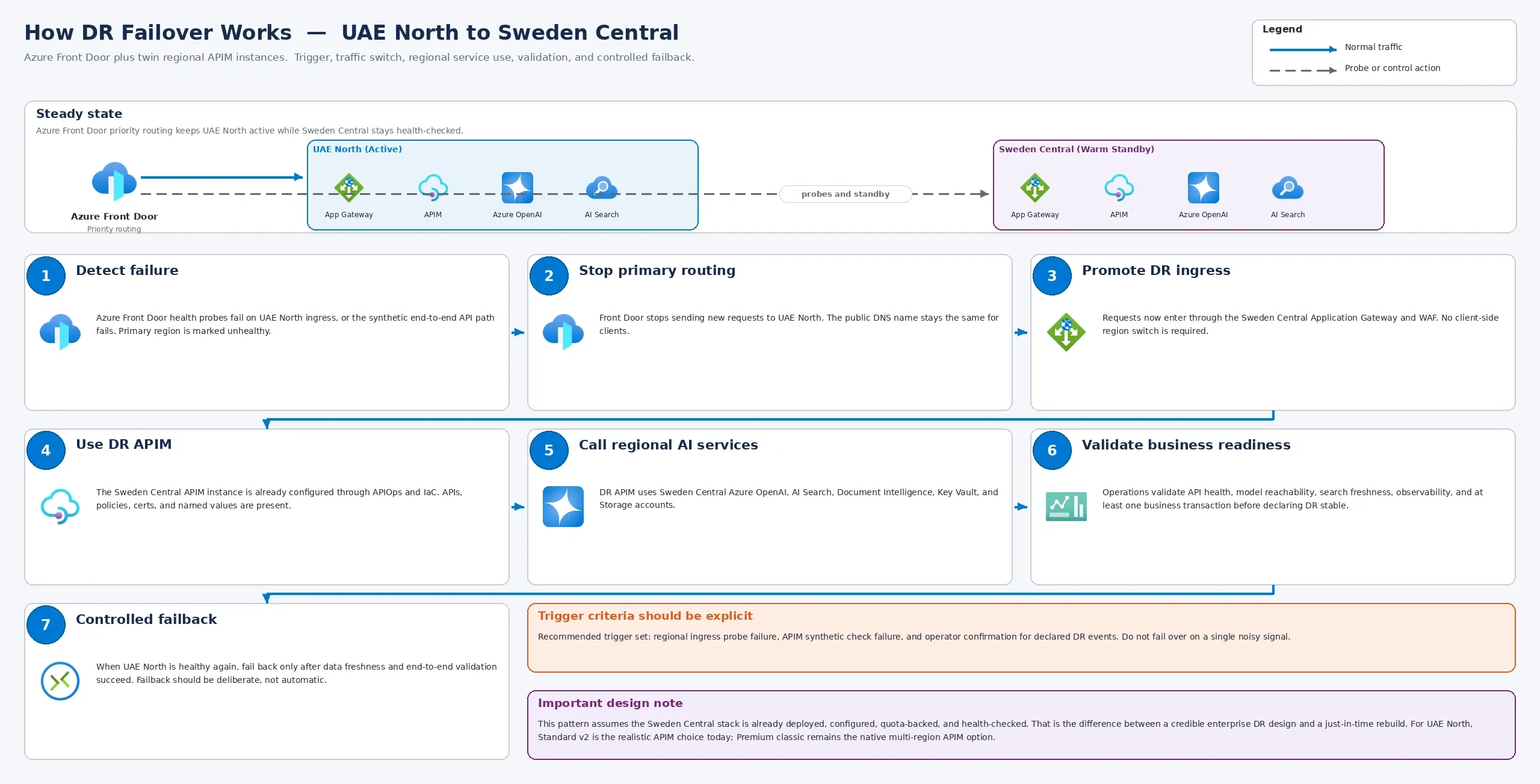
Figure 2: Sequence of required manual and automated validation gates during cutover. (Click diagram to expand)
Automated DR failovers for AI systems are structurally dangerous. Instead, document a precise operator trigger:
- Confirm Priority Shift: Validate Front Door has automatically evicted Priority 1 and traffic is flowing to Priority 2 matching the telemetry dashboards.
- Validate Data Freshness: The operator triggers a runbook to verify the Sweden Central AI Search Index synchronization is within the RPO (Recovery Point Objective) acceptable timeframe (e.g. < 5 minutes stale) before unlocking full user write capabilities.
- Re-test Grounding: Execute an explicit end-to-end synthetic API test hitting the Sweden Central APIM to ensure the RAG model successfully queries the DR Search Vector Index before publicly declaring the failover sequence successful.
The Traps to Avoid
Enterprise deployments stall at the design phase due to predictable mistakes. Confusing High Availability (intra-region AZ distribution) with Disaster Recovery (cross-region localized isolation) completely misses the mark.
Furthermore, expecting AI Foundry deployments to seamlessly auto-scale during a planetary-scale event without distinct RTO/RPO models is an architectural gamble you will lose.
Final Stance
A cross-geography DR pattern for AI and API workloads is inherently a customer-engineered resilience pattern, not a product feature bundle. If you are going this route, commit to Standard v2 with twin regional instances, separate regional AI model commitments, and a DNS governance strategy that actually survives cutover night.
That is not the lowest effort design, but it is the one you can confidently stand behind when the dashboard turns red.
References & Further Reading
- Azure Quickstart Template: Front Door Standard/Premium with API Management Origin — NSG lockdown +
X-Azure-FDIDheader validation pattern. - APIM with VNet — External Mode — Required NSG rules for APIM management traffic.
- Azure APIOps Toolkit (GitHub) — Extractor/Publisher pipeline for multi-region APIM config parity.
- Full Bicep/ARM Source Code (GitHub) — Deploy the Front Door + APIM lockdown template directly.
Ready to operationalize your Azure journey?
Stop trusting slide decks and start engineering for failure. Review the tools required for comprehensive migration strategies below.