
In This Article
Enterprise AI is moving beyond the "pick one best model" mindset. That approach is already outdated.
The critical architectural question is no longer which LLM is best, but rather: Which model should handle which task, under what controls, at what cost, in which region, and with what audit trail?
This article is written as a decision guide for Azure architects, enterprise AI platform owners, CISOs, cloud directors, and senior technical leaders. It focuses on where Model Router fits, where it does not, and the operating controls required to make dynamic model selection safe in production.
Executive Summary
Use Model Router for variable AI workloads. Do not use it where fixed-model control, strict audit repeatability, or regulatory determinism are mandatory.
Hardcoded model choice drives overspend, slow change, and inconsistent governance.
Centralize routing in the platform, then pin high-control workflows to approved endpoints.
Lower model waste, faster upgrades, and stronger enterprise control.
Board-level metric: measure cost per accepted business outcome, not raw token spend.
The Decision Problem: One Model Is Not an Operating Model
The Model Router discussion should not be framed around which model to use. That is too narrow. The more useful architecture question is: What operating model gives the business the right balance of quality, cost, latency, observability, compliance, and accountability?
A single model endpoint is not an operating model. Enterprise AI requires a decision layer, an access layer, an orchestration layer, and a control framework around all four.
- Every workflow defaults to the most expensive model out of developers' convenience.
- Critical business decisions are routed to low-capability models to meet arbitrary budgets.
- Model selection is buried inside deep application code, invisible to platform administrators.
- Governance teams approve an AI use case but fail to regulate the model pool behind it.
- Teams confuse dynamic model routing with AI platform governance.
Architectural Mandate
The goal is not to use the biggest model. The goal is to use the right model, for the right task, with the right controls, placed inside a governed platform pattern.How Azure AI Foundry Model Router Works
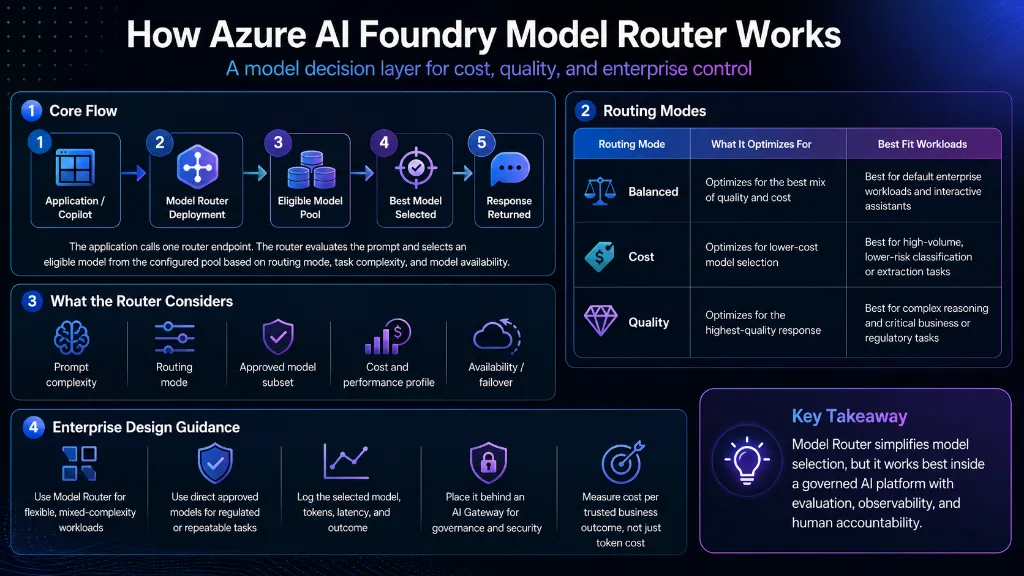
Model Router should be treated as the model decision layer. Instead of directly calling a fixed model endpoint, an application calls a Model Router deployment.
Microsoft documents that the router evaluates prompt complexity and routing mode, then selects from the configured eligible model pool. The selected underlying model is returned in the API response model field, which makes it observable for downstream logging and audit analysis.
Source: Microsoft Learn documentation for Model Router concepts and how routing works.
Microsoft documents three primary routing modes:
Balanced Mode
Optimizes: Best combination of quality and cost.
Fit: Default enterprise workloads and interactive assistants.
Cost Mode
Optimizes: Lower-cost model selection.
Fit: High-volume, lower-risk classification/extraction.
Quality Mode
Optimizes: Highest-quality reasoning output.
Fit: Complex multi-step reasoning workloads that still permit dynamic routing.
To understand the operational boundary, let's contrast the Model Router with the AI Gateway:
Model Router vs AI Gateway
Model Router: The Model Decision Layer
- Optimizes individual prompt execution path
- Evaluates prompt complexity dynamically
- Selects a cost-effective eligible model based on routing mode, prompt complexity, and the configured model pool
- Operates inside the regional workspace boundary
- Manages subset eligibility for local workloads
AI Gateway: The Access and Governance Layer
- Enforces authentication, authorization, and audit logs
- Applies global rate limits and user-level token quotas
- Provides semantic caching and circuit breaking
- Runs as a managed API gateway layer, with tier-dependent scaling, regional deployment, policy, and observability capabilities
- Applies prompt and response safety policies, including Azure AI Content Safety integration where configured
Region, Throughput, and Cost Planning
As of the current Microsoft documentation, Model Router deployment requires the Foundry resource to be in East US 2 or Sweden Central. This should be validated before production rollout because Azure AI Foundry feature availability can vary by model, deployment type, quota, and region.
Source: Microsoft Learn Model Router deployment guidance.
For European workloads, Sweden Central with Data Zone Standard is a strong starting point when EU data-zone processing is required.
It supports prompt and response processing within the Microsoft-defined EU data zone, but final sovereignty and compliance posture must still be validated against the customer's legal, regulatory, and contractual requirements.
When to Use Model Router
Use Model Router when workload complexity varies and the platform benefits from dynamic model selection inside an approved model pool.
Support Triage & FAQ Drafting
Routes to smaller, lower-cost models optimized for high-volume, repetitive text generation.
Sentiment Analysis & Summarization
Balanced selection across eligible tiers for moderate reasoning tasks requiring nuanced understanding.
Complex Analysis & Synthesis
Routes to higher-capability reasoning models or to a direct approved endpoint when the task requires stronger quality control.
Operating Model Considerations
1. Reduces Hardcoded Selection Logic
Without Model Router, teams often build brittle application code containing nested conditional switches to select endpoints based on task name or budget rules. Model Router encapsulates this complexity by exposing a stable endpoint while platform engineers govern routing modes, eligible model subsets, and deployment policy.
2. Enforces Approved Model Subsets
Model Router honors the configured deployment type and eligible model pool, including data-zone boundaries where applicable. However, enterprise enforcement still requires Azure Policy, RBAC, API gateway policy, logging, private networking, approved model governance, procurement controls, and legal review.
Provider caveat: Some model families have additional deployment requirements. For example, Microsoft documents that Claude models must be deployed separately before Model Router can route to them.
Validate provider-specific setup before assuming every catalog model is immediately routable. See Microsoft Learn Model Router how-to guidance.
3. Supports Model Abstraction
Model abstraction is critical. When application business logic directly binds to specific model IDs, model deprecation breaks production code. The Model Router exposes a stable, abstracted endpoint while platform engineers update underlying models seamlessly.
4. Managed Model-Level Failover
If a model endpoint experiences elevated latency or throttling, the Model Router can redirect requests to an alternative capable model in the subset. However, this is not a substitute for full network-level disaster recovery (using APIM or Azure Front Door).
Model Router vs Direct Approved Model
- Use Model Router when workloads are mixed, prompt difficulty is unpredictable, and the platform needs one governed endpoint that can route across an approved model subset.
- Use a direct approved model deployment when regulation, benchmarking, or contractual control requires a fixed model version and repeatable execution path.
- Do not use either pattern as a governance substitute. Gateway policy, observability, evaluation, and human accountability remain separate architectural responsibilities.
- Review context and modality constraints carefully. Eligible model pools and deployment types can change the practical limits of the workload you are routing.
Cost Planning
Model Router is billed based on token consumption rather than fixed hourly instances. The calculation uses variable parameter P, which represents the input price per million tokens (based on your Azure Enterprise Agreement or public rates).
The default calculator value uses P = $1 per 1M input tokens only as a placeholder. Replace P with the current Model Router input-token price from Azure Pricing Calculator or your Microsoft agreement.
Core Planning Formula
Hourly cost =(input tokens per hour / 1,000,000) × current Model Router input price per 1M tokens Monthly cost =
Hourly cost × active usage hours per month
Interactive FinOps Estimator
This comparison is illustrative only. Actual cost depends on current pricing, selected model, routing mode, model subset, prompt length, output length, latency, and human rework rate.
FinOps Interpretation
A low-cost model output that needs human rework is not cheap. A higher-cost model that produces a trusted answer in one pass may be cheaper at the workflow level.The FinOps lesson is clear: the cost problem is rarely the router itself; it is uncontrolled prompt volume, unmanaged workflow loops, and poor outcome quality. Establish metric logging for cost per accepted business outcome rather than tracking raw token cost alone.
Throughput Planning
Cost is only one side of design; throughput limits are the other. Before a production rollout, architects must validate the available Requests Per Minute (RPM) and Tokens Per Minute (TPM) quota configurations.
Ask these strategic planning questions:
- What is the peak expected requests per minute vs average load?
- Which business processes are interactive (requiring immediate, low-latency responses) and which can run asynchronously?
- What is the downstream fallback when the quota is exhausted (HTTP 429)?
- Do you need to request quota allocations or Provisioned Throughput (PTU) before launching?
Always design for peak load concurrency and apply exponential backoff retry behaviors inside the orchestration layer, specifically in the middleware that wraps Model Router calls (for example, a Semantic Kernel plugin, LangChain chain, or a custom APIM retry policy). This retry logic must live at the call site, not inside Model Router itself.
Enterprise Architecture Pattern
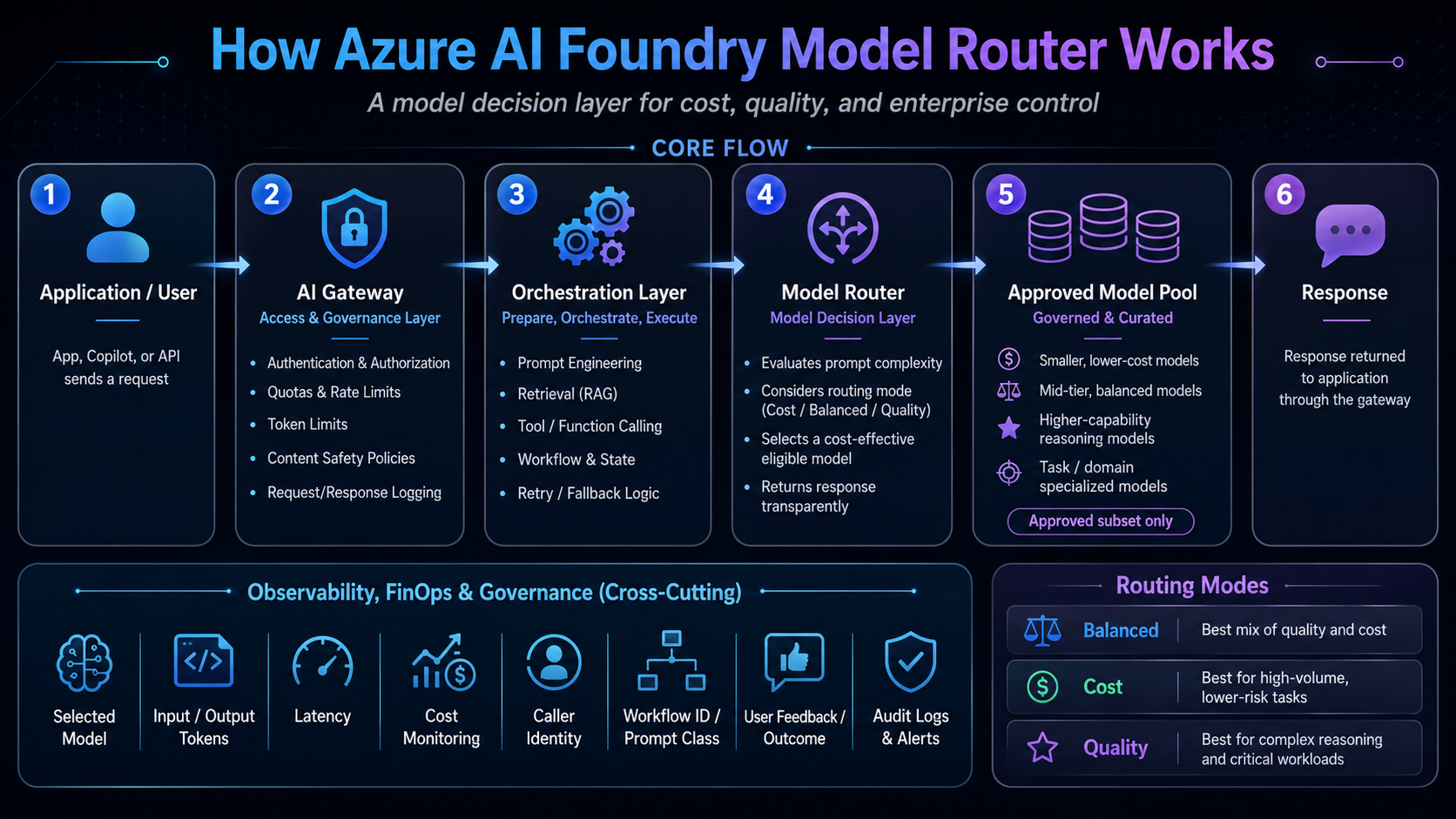
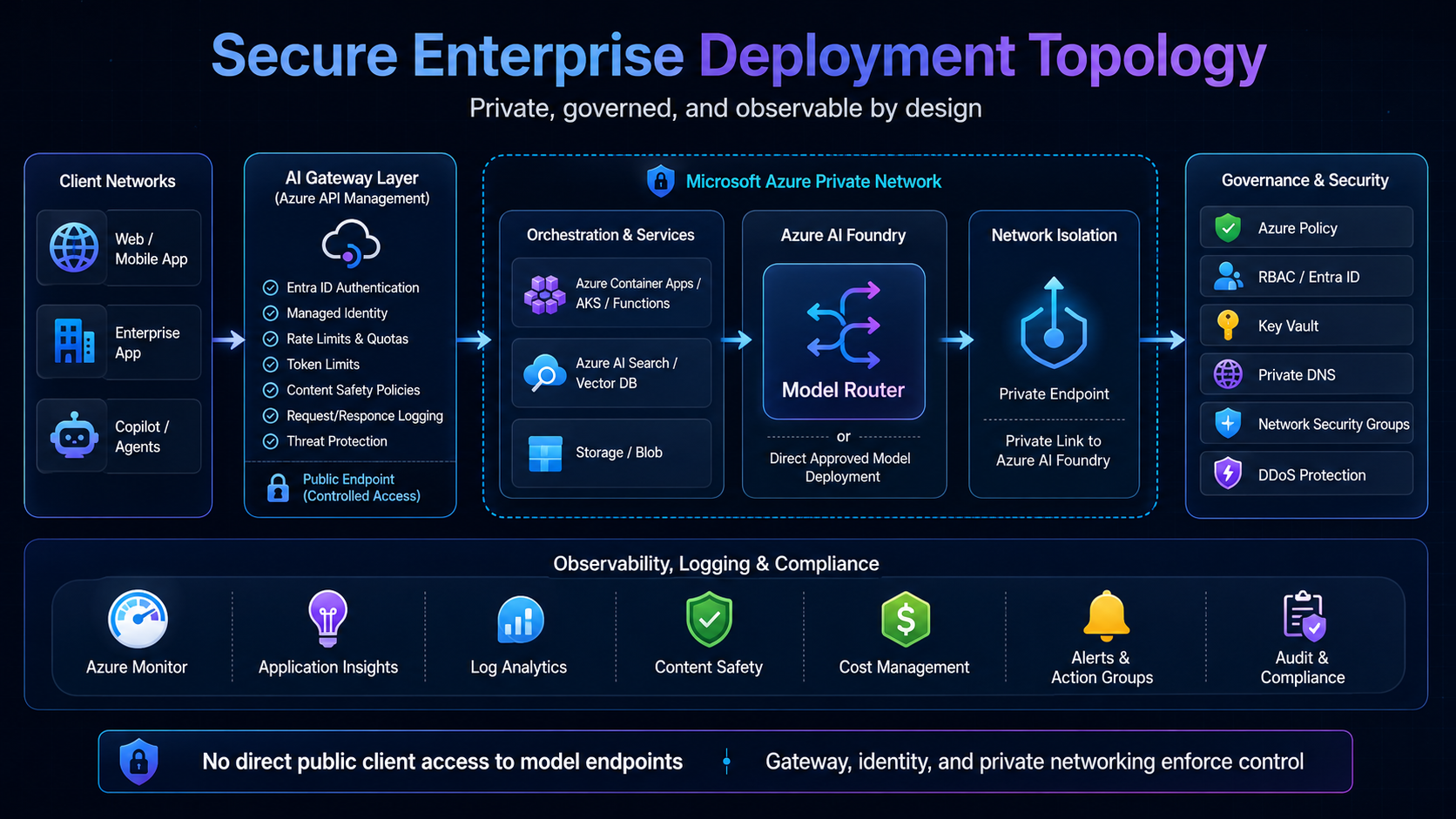
Model Router should sit inside a structured enterprise flow rather than being exposed directly to client applications. In production, the surrounding platform still owns access policy, orchestration, observability, evaluation, and human accountability.
Reference Architecture Pattern
In this pattern, the AI gateway handles access, policies, quotas, logging, and safety. The orchestration layer handles retrieval, prompt construction, workflow state, retries, and tool calling.
Model Router handles dynamic model selection for flexible workloads. Direct approved models handle regulated or repeatable workloads. Evaluation and observability validate cost, quality, latency, grounding, and human rework.
Decision Framework: Where Model Router Fits
Deploy Model Router when your workload has variable complexity, meaning different incoming queries require different degrees of cognitive capability.
When Not to Use Model Router
Bypass or tightly constrain the Model Router in scenarios where strict determinism, regulation, or specific performance constraints exist.
Model Router vs Direct Approved Model
The architectural choice is often not simply router or no router. It is whether the workload benefits from dynamic selection inside an approved pool or whether it requires a direct approved model deployment with tighter execution controls.
- Regulated decision workflows: use a direct approved model deployment to support strict audit review.
- Strict benchmark testing: pin a fixed model version for repeatable output measurements.
- Deterministic validation: enforce business rules in code rather than routing simple logic to an LLM.
- Provider-specific specialization: use a direct approved model when the workload depends on a specific model family or setup path.
Operating Model Controls
1. Start with Balanced Mode
Balanced mode provides the safest starting profile. Monitor performance, cost, and latency metrics against representative prompts before switching to Cost or Quality modes.
2. Classify Prompts by Business Criticality
Never route all prompts blindly. Intercept prompts at the orchestration layer and map them:
- Low risk tasks (Metadata extraction, triage) → Cost Mode.
- Medium risk tasks (Summarization) → Balanced Mode.
- High risk tasks (Financial advising) → Quality Mode / Direct Pinned Model.
3. Use Approved Model Subsets
Define a subset matching your region's compliance lanes. In Sweden Central, restrict the pool to models available under the Data Zone Standard deployment type in your approved region. Verify this list directly in Azure AI Foundry because there is no static public certification registry for your exact enterprise policy boundary.
4. Log the Selected Model
Do not let the router become a black box. The selected underlying model should be captured from the API response model field and logged with prompt class, routing mode, input tokens, output tokens, latency, caller identity, workflow ID, and outcome. A downstream telemetry schema should capture at least:
{
  "routingMode": "balanced",
  "selectedModel": "model-name",
  "promptClass": "high-risk",
  "inputTokens": 8500,
  "outputTokens": 1200,
  "latencyMs": 7400,
  "callerIdentity": "application-or-user-id",
  "workflowId": "business-workflow-id",
  "userRating": 4,
  "humanOverride": false
}
5. Build an Evaluation Harness
Establish automated evaluations tracking hallucination rate, grounding accuracy, and response consistency. When the router switches models dynamically, automated tests must verify that response quality remains within tolerance.
6. Separate Retrieval from Reasoning
The Model Router selects models for reasoning capabilities. Enterprise context must be retrieved beforehand (via RAG indexing) and injected as grounded context, rather than relying on the LLM's static training data.
7. Do Not Use LLMs for Everything
Deterministic validations (null checks, range validation, pattern matching) should be run directly in code. Using LLMs for simple code-level checks is slow, expensive, and insecure.
8. Design Fallback Explicitly
Model Router handles model selection but not application resilience. Incorporate retry policies, circuit breakers, and alternate regions (e.g., East US 2) for disaster recovery planning.
Practical Decision Framework
Use this interactive decision advisor or switch to the quick lookup table to evaluate target patterns for model routing:
Decision note
This comparison is illustrative only. Actual cost depends on current pricing, selected model, routing mode, model subset, prompt length, output length, latency, and human rework rate.Production Risks and Controls
Model routing can fail as an operating model if teams do not control the surrounding platform.
Common failure patterns include:
- Treating Model Router as a full AI governance layer.
- Allowing uncontrolled model subsets in production.
- Ignoring router version changes and auto-update behavior.
- Measuring only token cost instead of cost per accepted outcome.
- Sending large documents directly to the model instead of using extraction, chunking, retrieval, and grounding.
- Using dynamic routing for regulated workflows that require a fixed approved model.
- Failing to log the selected model, token usage, latency, caller identity, and workflow context.
- Assuming data-zone alignment equals complete legal sovereignty.
Version drift and auto-update risk
Model Router versions can introduce a different set of underlying models. If auto-update is enabled, routing behavior, output quality, latency, and cost profile can change over time.
Production workloads should treat Model Router version updates like controlled platform changes. Evaluate the new router version against representative prompts before promotion. Track selected model, cost per workflow, latency, grounding quality, and human rework rate.
The fix is not to avoid Model Router. The fix is to use it inside a governed AI platform with gateway controls, approved model subsets, observability, evaluation, FinOps controls, and human accountability.
Final Recommendation
Model Router is useful for dynamic model selection, but production-grade enterprise AI still needs gateway governance, approved model subsets, observability, evaluation, FinOps controls, and human accountability.
Use it where flexibility, scale, and mixed-complexity workload patterns matter. Bypass it where regulatory control, benchmark repeatability, or fixed-model assurance are mandatory.
The goal is not to use the biggest model.
The goal is to use the right model, for the right task, with the right controls.
Executive Takeaway
Model Router should optimize model choice, not own enterprise risk. The winning pattern is simple: route dynamically where you can, pin explicitly where you must, and govern both through gateway policy, approved models, observability, evaluation, and human accountability.Deployment Checklist
Use this checklist to review production readiness before rollout.
References
Primary Microsoft references used for architecture guidance, routing behavior, gateway controls, and data protection considerations.
Ready to operationalize your Azure journey?
Standardizing model layer abstraction is one of the pillars of high-fidelity cloud systems. Let's discuss how to align your AI platform architecture with FinOps controls and regulatory compliance.