Azure Migration Specifications & Templates
This document contains the detailed specifications for the tools and templates referenced in the Azure Migration Toolkit.
1. Portfolio Assessment Matrix (Specification)
Use this structure to build your Excel tracking sheet.
| Column Name | Data Type | Description | Example Value |
|---|---|---|---|
| App ID | String | Unique identifier for the application | APP-001 |
| App Name | String | Common name of the application | Global Finance Reporting |
| Owner | String | Business owner email | finance.lead@company.com |
| Criticality | Dropdown | Tier 1 (Critical) to Tier 4 (Archive) | Tier 1 |
| RTO/RPO | String | Recovery Time/Point Objective | 4h / 15m |
| Data Class | Dropdown | Public, Internal, Confidential, Restricted | Confidential |
| Compliance | Multi-Select | GDPR, SOX, PCI-DSS, HIPAA | SOX, GDPR |
| Dependencies | List | Upstream/Downstream App IDs | APP-045, DB-SQL-02 |
| Tech Score | 1-5 | 1 (Cloud Ready) to 5 (Legacy/Complex) | 4 |
| Strategy | Dropdown | Rehost, Refactor, Rearchitect, Rebuild, Replace, Retire | Rehost |
| Move Group | String | ID of the migration wave | WAVE-2-FINANCE |
| Target Sub | String | Azure Subscription ID | sub-prod-finance-01 |
| Est. Cutover | Date | Planned migration date | 2025-11-15 |
2. Right-Sizing & TCO Calculator (Logic)
Use these formulas to build your TCO model.
Inputs
- Current vCPU:
8 - Current RAM (GB):
32 - Avg CPU Utilization %:
15% - Peak CPU Utilization %:
45% - OS Type:
Windows Server - SQL Edition:
Standard
Right-Sizing Logic
- Target vCPU =
MAX(Current vCPU * Peak CPU %, 2)(Ensure minimum 2 cores) - Target RAM =
Current RAM(Usually 1:1 unless memory utilization is known to be low) - Recommended SKU: Lookup against Azure VM catalog (e.g., D-Series for General, E-Series for Memory).
Cost Optimization Logic
- Pay-As-You-Go (PAYG):
SKU Hourly Rate * 730 hours - With AHB (Hybrid Benefit):
(Linux Rate * 730 hours)(Removes Windows License cost) - With 3-Year RI:
PAYG Rate * (1 - 0.60)(Approx 60% discount) - Total Monthly Savings:
PAYG Cost - (RI Cost + AHB Savings)
3. Migration Runbook (Template)
Phase 1: Pre-Flight (T-Minus 1 Week)
Connectivity: Verify ExpressRoute/VPN status is
Connected.Network: Validate NSG rules allow traffic from on-prem to Azure Target Subnet.
Identity: Ensure Migration Account has
Contributor access on
Target Resource Group.Replication: Check Azure Site Recovery (ASR) replication health is
Healthy.Test Failover: Perform isolated test failover to VNET-TEST. Validate app
startup.
Phase 2: Cutover Window (T-Zero)
00:00 - Initiate "Maintenance Mode" page for end-users.
00:15 - Stop on-prem Application Services (IIS/Tomcat).
00:30 - Stop on-prem Database Services (SQL/Oracle).
00:45 - Perform final data sync (ASR/DMS).
01:30 - POINT OF NO RETURN. Initiate Failover to Azure.
02:00 - VM Boot check. Verify Azure Agent status.
02:15 - Update Internal DNS (A Records) to point to new Azure Private IPs.
02:30 - Start Application Services in Azure.
02:45 - Smoke Test: Login, Run Report, Check Logs.
Phase 3: Post-Cutover
03:30 - Sign-off from App Owner.
04:00 - Disable "Maintenance Mode".
Day 1 - Monitor CPU/RAM and Latency metrics.
4. Operating Model Repository Structure
Recommended folder structure for a azure-migration-operating-model GitHub repository.
/
├── .github/
│   └── workflows/              # CI/CD pipelines for Policy/IaC
├── decisions/                  # Architecture Decision Records (ADRs)
│   ├── ADR-001-naming-convention.md
│   ├── ADR-002-hub-spoke-network.md
│   └── ADR-003-tagging-strategy.md
├── governance/
│   ├── naming-convention.json  # Machine-readable naming rules
│   └── rbac-matrix.csv         # Role assignments
├── policies/                   # Azure Policy Definitions
│   ├── definitions/
│   │   ├── storage-account-secure.json
│   │   └── allowed-locations.json
│   └── assignments/
│       ├── prod-assignment.json
│       └── nonprod-assignment.json
├── patterns/                   # Bicep/Terraform Modules
│   ├── networking/
│   │   ├── hub-vnet.bicep
│   │   └── spoke-vnet.bicep
│   └── compute/
│       └── standard-vm.bicep
└── README.md                   # The "Start Here" guide for the team
5. Architecture Diagrams
Diagram A: Enterprise Hub-and-Spoke Topology
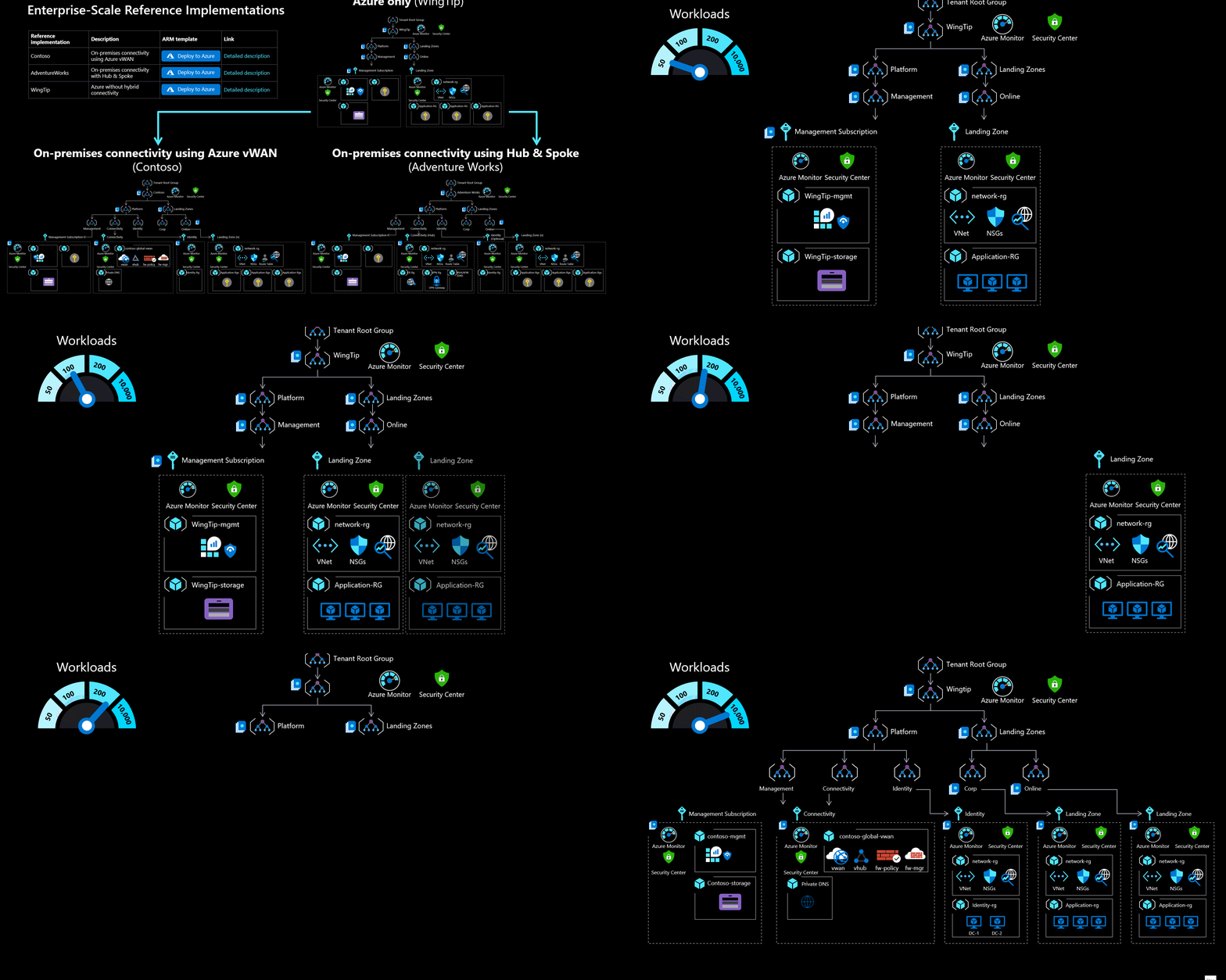
Figure: Azure Enterprise Scale Landing Zone (ESLZ) Architecture Reference
Diagram B: Management Group Hierarchy
graph TD
%% Enterprise Styles
classDef root fill:#0078d4,stroke:#fff,stroke-width:2px,color:#fff;
classDef platform fill:#5c2d91,stroke:#fff,stroke-width:2px,color:#fff;
classDef lz fill:#00cc6a,stroke:#fff,stroke-width:2px,color:#fff;
classDef sandbox fill:#ea4300,stroke:#fff,stroke-width:2px,color:#fff;
classDef decom fill:#a0aeb2,stroke:#fff,stroke-width:2px,color:#fff;
classDef sub fill:#2b3c5a,stroke:#fff,stroke-width:1px,color:#fff;
Root[" Tenant Root Group"]
Contoso[" Contoso Org
(MFA, Audit)"] Platform[" Platform"] LZ[" Landing Zones"] Sandbox[" Sandbox"] Decom[" Decommissioned"] Identity[" Identity"] Mgmt[" Management"] Conn[" Connectivity"] Corp[" Corp"] Online[" Online"] Fin[" Finance"] HR[" HR"] Ecom[" E-Commerce"] Root --> Contoso Contoso --> Platform Contoso --> LZ Contoso --> Sandbox Contoso --> Decom Platform --> Identity Platform --> Mgmt Platform --> Conn LZ --> Corp LZ --> Online Corp --> Fin Corp --> HR Online --> Ecom class Root,Contoso root; class Platform platform; class LZ lz; class Sandbox sandbox; class Decom decom; class Identity,Mgmt,Conn,Corp,Online,Fin,HR,Ecom sub;
(MFA, Audit)"] Platform[" Platform"] LZ[" Landing Zones"] Sandbox[" Sandbox"] Decom[" Decommissioned"] Identity[" Identity"] Mgmt[" Management"] Conn[" Connectivity"] Corp[" Corp"] Online[" Online"] Fin[" Finance"] HR[" HR"] Ecom[" E-Commerce"] Root --> Contoso Contoso --> Platform Contoso --> LZ Contoso --> Sandbox Contoso --> Decom Platform --> Identity Platform --> Mgmt Platform --> Conn LZ --> Corp LZ --> Online Corp --> Fin Corp --> HR Online --> Ecom class Root,Contoso root; class Platform platform; class LZ lz; class Sandbox sandbox; class Decom decom; class Identity,Mgmt,Conn,Corp,Online,Fin,HR,Ecom sub;