Imagine a brilliant scholar locked in an empty room.
They possess every book in the world up to a certain year, can solve complex calculus, and write poetry in passing. But ask them, "What is the current stock price of Apple?" or "Check my calendar for conflicts," and they are helpless.
This has been the reality of Large Language Models (LLMs) for years. To connect them to the outside world—databases, file systems, live internet data—engineers have had to build a chaotic web of custom bridges.
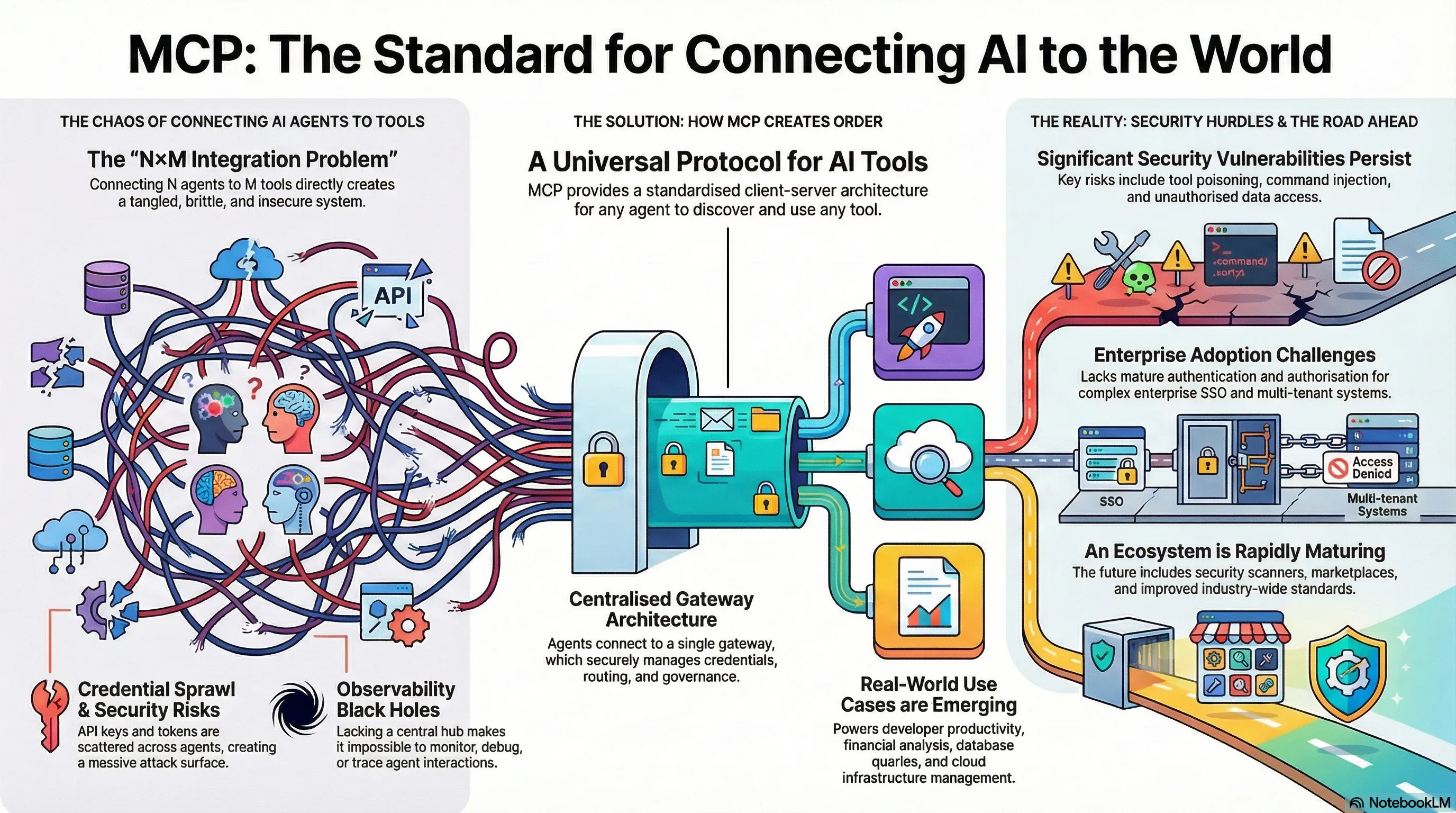
This was the "N×M integration problem": if you had AI models and data sources, you needed a unique, brittle connector for every single pairing. It was a Tower of Babel where every tool spoke a different language, and maintenance was a nightmare.
Enter the Model Context Protocol (MCP). Introduced by Anthropic in late 2024, MCP is not just another API; it is the "USB-C for AI"—a universal standard that is fundamentally changing how digital minds interact with the digital world.
The Anatomy of a Universal Language
To understand why MCP is revolutionary, we must look under the hood. The protocol replaces the messy spaghetti code of the past with a clean, standardized architecture. It operates on a client-server model, much like the web itself.
%%{init: { "theme": "dark", "themeVariables": { "fontFamily": "Inter", "fontSize": "16px", "primaryColor": "#0f172a", "primaryTextColor": "#fff", "primaryBorderColor": "#38bdf8", "lineColor": "#94a3b8", "secondaryColor": "#1e293b", "tertiaryColor": "#1e293b" } } }%%
flowchart LR
    subgraph HostEnv ["MCP Host Environment"]
        direction TB
        Client([🤖 AI Client
Claude / IDE / Agent])
        Host[MCP Host Process
Connection Manager]
        Client <==> Host
    end

    subgraph Protocol ["The Universal Standard"]
        direction TB
        Transport{🔌 JSON-RPC
Stdio / SSE}
    end

    subgraph ServerEnv ["MCP Server Ecosystem"]
        direction TB
        ServerDB[MCP Server: PostgreSQL]
        ServerFile[MCP Server: Filesystem]
        ServerSaaS[MCP Server: GitHub/Slack]
    end

    subgraph Data ["Data & Systems"]
        direction TB
        DB[(Corporate
Database)]
        Files[Local
Repositories]
        API[External
APIs]
    end

    Host ==> Transport
    Transport ==> ServerDB
    Transport ==> ServerFile
    Transport ==> ServerSaaS

    ServerDB -.-> DB
    ServerFile -.-> Files
    ServerSaaS -.-> API

    %% Styling
    classDef client fill:#0ea5e9,stroke:#0284c7,stroke-width:2px,color:#fff;
    classDef host fill:#1e293b,stroke:#94a3b8,stroke-width:2px,color:#cbd5e1;
    classDef transport fill:#a855f7,stroke:#a855f7,stroke-width:2px,color:#fff;
    classDef server fill:#0f172a,stroke:#38bdf8,stroke-width:2px,color:#38bdf8;
    classDef data fill:#1e293b,stroke:#64748b,stroke-width:2px,stroke-dasharray: 5 5,color:#cbd5e1;
    classDef container fill:#0f172a,stroke:#334155,stroke-width:1px,color:#94a3b8;

    class Client client;
    class Host host;
    class Transport transport;
    class ServerDB,ServerFile,ServerSaaS server;
    class DB,Files,API data;
    class HostEnv,ServerEnv,Data,Protocol container;
Figure 1: The MCP Client-Server Architecture (Enterprise View)
The Three Primitives
The genius of MCP lies in its three "primitives"—the nouns and verbs of this new language:
- Resources: Passive data streams, like logs or file contents, that give the model context. Think of these as the "reading" capability.
- Tools: Executable functions, such as
run_queryorcreate_ticket, that allow the agent to take action. These are the "hands" of the model. - Prompts: Reusable templates that standardize how agents interact with specific tasks, ensuring consistent behavior.
Visual Guide: MCP Infographic
Stop burning your budget on “context bloat.”
I see too many teams implement MCP and then wonder why their LLM bill spikes.
MCP is the skeleton. If you do not add cost controls like on-demand tool loading and filtered data streams, you end up paying the model to read metadata and payloads it does not need.
Cost Control: Don’t Pay for Tokens You Don’t Need
As MCP adoption grows, the default failure mode is predictable: you register more servers, expose more tools, stream more resources, and your agent becomes “chatty” at the worst possible layer, the token layer.
Here’s how to avoid it.
1) On-demand tool loading (tool gating)
Do not present every tool to the model all the time.
- Load tools per workflow (incident response, finance query, HR request).
- Keep a small “core” toolset always available, everything else is opt-in.
- Use a lightweight router (rules or a small classifier model) to decide which tool bundle to mount.
Goal: the model sees fewer tool schemas, and chooses faster.
2) Filtered data streams (server-side filtering)
Do not stream full datasets as “context”.
- Push filtering down to the MCP server.
- Return small, shaped results: top N, specific fields, short excerpts.
- Prefer “search” and “get-by-id” patterns over “dump and let the model read”.
Goal: the model receives answers, not raw haystacks.
3) Execution environments (compute near the data)
When results still need processing, do it outside the model.
- Let the agent run code in a sandbox to sort, join, dedupe, or summarize.
- Return only the final result back into the context window.
This aligns with your existing “code execution” narrative and the token reduction point you already cite.
4) Context engineering (practical rules)
- Cap tool descriptions and keep schemas tight.
- Enforce max payload sizes per tool response.
- Add caching for tool discovery and repetitive lookups.
- Instrument tokens per tool call so you can see what is leaking budget.
The Efficiency Leap: Escaping the "Context Trap"
As developers began wiring up thousands of tools, they hit a wall. In the traditional "tool calling" method, if an agent needed to find a specific email in a massive dataset, the system would often dump all the data into the model's context window for processing.
It was like trying to find a needle in a haystack by feeding the entire haystack into a furnace.
The solution was a paradigm shift: Code Execution. Instead of asking the model to process raw data, MCP allows the model to write scripts (e.g., in Python) that run inside a secure sandbox. The agent becomes a programmer, writing code to filter the data at the source and returning only the answer.
Anthropic reported that this approach reduced token usage by 98.7%—dropping from 150,000 tokens to just 2,000 for complex tasks.
The Azure Fortress: Architecting for Enterprise
While the open-source community experiments with local servers, the enterprise demands a fortress. Microsoft has recognized MCP not just as a protocol, but as the missing link for its Azure AI Agent Service.
Live Example: Visit mcp.azure.com for a live example of an MCP server registry created using Azure API Center.
Case Study: The "Self-Healing" Cloud
The Challenge: A DevOps team struggled with "alert fatigue." When a server went down,
engineers had to manually query logs and run scripts.
The MCP Solution: An autonomous agent monitors Azure Monitor alerts.
When a "High CPU"
alert triggers, the agent uses MCP to query the live state via Terraform, identifies drift, and drafts a
remediation plan.
The Result: Mean Time to Resolution (MTTR) reduced by 75%, eliminating 90% of routine
manual interventions.
Presentation Deck: From Promise to Production
For a deeper dive into the architectural patterns and future roadmap of MCP, browse through the full presentation deck below.
View the Interactive Presentation
Explore the full architectural details, diagrams, and case study metrics in an immersive slide deck format.
View Presentation Deck (PDF)The Future: A Foundation for Autonomy
The story of MCP is no longer just about Anthropic. In a historic move to prevent fragmentation, the protocol was donated to the Linux Foundation, forming the Agentic AI Foundation (AAIF). Backed by OpenAI, Google, Microsoft, and Amazon, this ensures MCP becomes the neutral "connective tissue" for the industry.
We are moving away from simple chatbots toward true Agentic AI—systems that can plan, reason, and act across a boundless network of tools. MCP is the language they will speak.