Contents
- Executive Impact Summary
- The Spine
- Start with the Work
- One Ask, Many Projects
- Evaluate, then Prioritize
- Value Hypothesis
- Story per Buyer
- Route in Three Questions
- Fit Is Not Readiness
- Two Checks Before Recommending
- Worked Example
- Public Reference Builds
- Cheat Sheet
- Closing Thought
- Questions Leaders Ask
- Sources
An insurer asked AI to find missing documents, spot KYC gaps, catch fraud, cross-sell and stay profitable. That is five projects, not one, and funding them as one is how pilots stall.
Take the one-page template into your next AI review or customer call. It holds the one-sentence use case, five discovery questions and the next-step table on a single sheet.
Download the template (PDF) 1 page · free · no sign-upExecutive Impact Summary
The Business Problem
Pilots start without an owner, a baseline or a route. The sales cycle burns months and the budget never lands.
The Strategic Play
One chain, in order: workflow problem, use case, value hypothesis, solution route, next step. Seven stages replace the product-first conversation.
The Executive ROI
The return is credibility and risk avoidance, not a headline percentage. No savings figure reaches a CFO before a baseline is measured.
One Chain, Five Questions: The 60‑Second AI Review
“We need a chatbot.” “AI for claims.” “We want an agent.” These are clues, and the work is turning each one into a requirement.
Run every proposal down one chain, in order. Skip a link and the proposal falls apart. These are the five review questions:
| Link | Ask in the review | If skipped |
|---|---|---|
| Workflow problem | Who does this work today, and what hurts? | The product comes before the problem. |
| Use case | Can you say it in one sentence? | Nobody can judge the idea. |
| Value hypothesis | What is the baseline? | A savings claim nobody can defend. |
| Solution route | Where does it run, and who controls it? | The wrong build for the real need. |
| Next step | Who owns it on Monday? | The pilot stalls. |
The seven stages map onto the five links. Discover is the workflow problem. Define, Evaluate and Prioritize settle the use case. Prove builds the value hypothesis, Route picks the solution route and Progress is the next step. The cheat sheet at the end puts the stages on one page.
I’m building an insurance document-review solution on Azure right now, and it runs through the post as the example. Look for the blue “In the insurance case” boxes.
Start with the Work, Not the Tool
Before you talk about AI, ask five discovery questions:
- Who does the work today?
- Where is it slow, costly, risky or inconsistent?
- What output should improve?
- Where would AI touch people, systems, tools or data?
- What value does the customer expect?
Then write the use case as one sentence:
At [workflow step], [who] uses AI to [produce what] for [work item], while [human role] reviews or decides, so [outcome] improves.
Check it for five parts: the step, the user, the AI output, the human role and the outcome. A missing human role means nobody is accountable for the output, and a missing outcome leaves it without business value. Either gap makes the idea hard to judge.
Try it now. Write your current AI opportunity as that one sentence. If you can’t fill all five parts, you’ve found the real problem.
In the insurance case. At intake, AI flags missing documents in each customer file, while a person confirms and requests the rest, so file completeness improves.
One Ask Is Often Several Projects
“AI for onboarding” could mean document extraction, policy lookup, learning-plan generation, task monitoring or manager reminders. Each has different evidence, controls and success signals.
Look at the work for repeating patterns. Each pattern points to a different job for the AI:
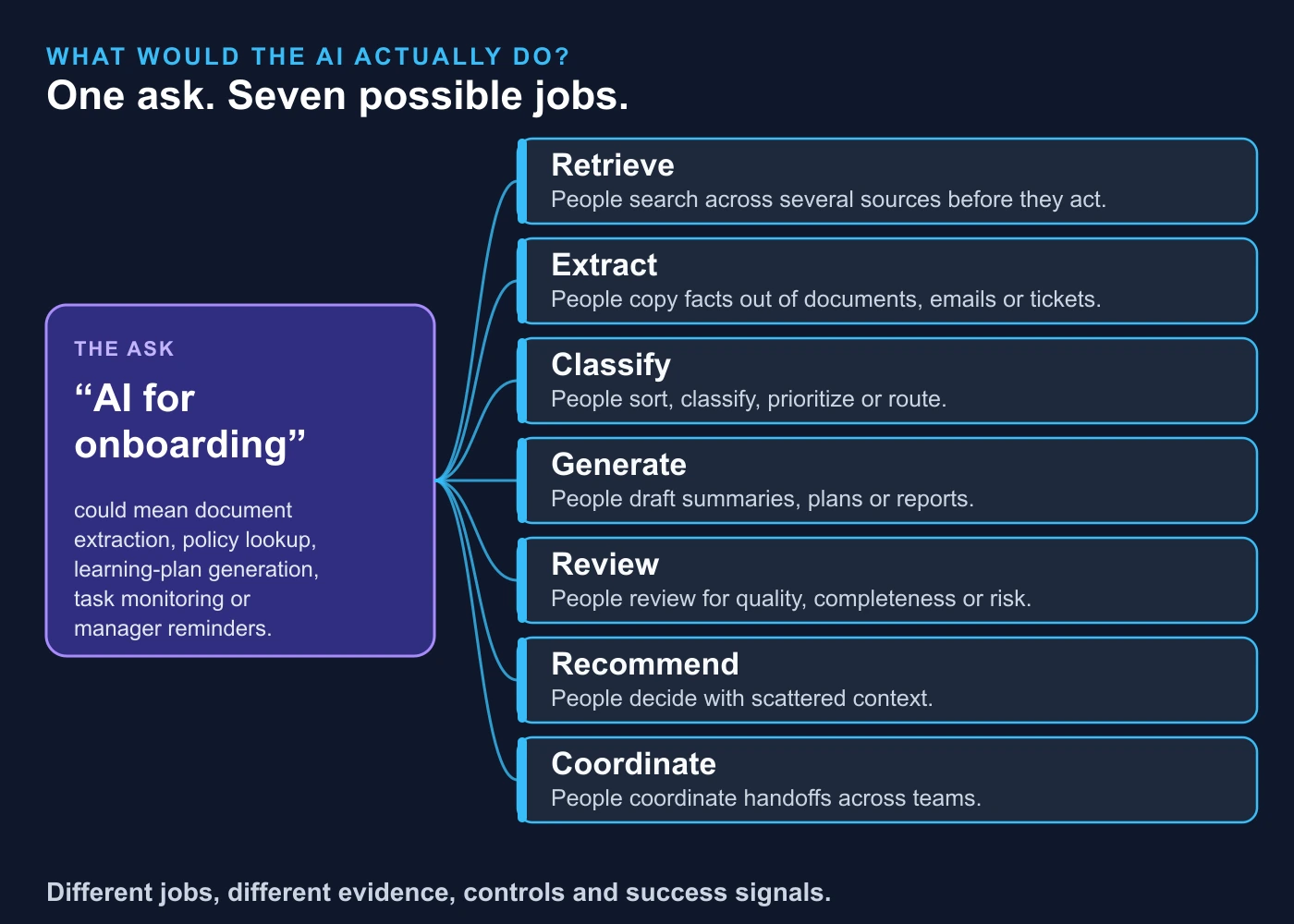
Then ask one question: what would the AI actually do for the user at this point? Pick the job from the map. Different jobs, different projects.
Pick the Right First Project, Not the Biggest
Choosing a first project means answering two different questions. Evaluation asks whether a candidate is meaningful and realistic enough to consider.
- Does it fix a real, frequent or painful friction?
- Is the workflow clear and the owner engaged?
- Can data be accessed and used for testing?
- Are errors reversible, and is human review realistic?
- Can we tell whether it worked, and is the scope small enough to validate?
Prioritization asks which viable candidate is the strongest place to start. The answer is rarely the biggest idea. It is the one that hits real pain, produces evidence fast, has visible support and leaves room to grow.
In the insurance case. Five projects hid inside one request. Missing documents won the first slot because the risk is low and the result is easy to measure. Fraud signals wait, because a person must decide every one.
In sensitive areas such as insurance, legal, medical, credit and hiring, people stay accountable for the decision. Design for that from day one.
With a first project chosen, the next step is to say what success looks like.
Turn Excitement into a Testable Bet
A success signal is an early sign the workflow is improving. It is a shared way to know what to watch, not a return figure. “The model is advanced” is weak. “Agents spend less time searching for policy answers” is strong.
A value hypothesis turns the outcome into something testable:
Because [current problem] affects [stakeholder or outcome], improving [step or output] with AI could help [measurable improvement], which matters because [customer priority].
Then separate what you know from what you assume. Known means the customer told you or showed you. Assumed means it could be true, but nobody has proved it. Pair every assumption with the next validation step: how you will find out.
Time saved is not money saved
This is the point I see missed most often. Saved hours can turn into more cases handled, better quality, less backlog, avoided hiring or a real cost cut. Each path needs different proof.
The analogy. Saved capacity is an empty seat on a bus. It becomes savings only when someone cuts the route, sells the seat or stops buying the bus. Until then, you have capacity, and the CFO knows the difference.
| If you have… | You can usually say… | Do not say yet… |
|---|---|---|
| Volume and current time spent | “This may represent saved capacity.” | “This is cost savings.” |
| Current cost and a validated improvement | “This may be potential gross benefit.” | “This is final ROI.” |
| Cost, adoption, time horizon, effort and a value-conversion path | “This can support an ROI model.” | “ROI is proven.” |
Compare cost per accepted output, including retries, human review and failed runs. Fewer tokens, the units a model is billed by, does not automatically mean a cheaper task.
Same Facts, Different Story per Buyer
Do not invent new claims for each audience. Change the emphasis.
| Stakeholder | Lead with |
|---|---|
| CFO | Financial exposure, cost, assumptions, confidence in the estimate |
| COO | Throughput, cycle time, operating burden, service quality |
| CIO / CTO | Scalability, integration, governance, data access, control |
| Workflow owner | Daily usability, quality, adoption, effort |
| Executive sponsor | Strategic priority, urgency, risk of doing nothing |
A strong narrative is short enough for a sponsor to repeat to someone else. Once the story holds, the question becomes how to build it.
Route in Three Questions
Customers say “agent,” “copilot,” “automation” or “migration.” Those words don’t tell you the route. Use three questions, then a fourth for what comes next.
- Where will the person or workflow operate? The user or product surface: a collaborative chat tool, a delegated work tool, a coding tool, or an application built with the API.
- What must the system do? The capability: retrieval, extraction, classification, tool use, approvals or multi-step action.
- Where and how will it run and be controlled? Deployment and operations: identity, permissions, approvals, retention, logging and human review. Self-managed or open-weight options matter only when a real requirement is validated and hosted controls have been weighed.
- Then: what should happen next? The progression step: more discovery, validation, technical handoff or migration discovery.
I draw it as a square, with the use-case sentence in the middle:
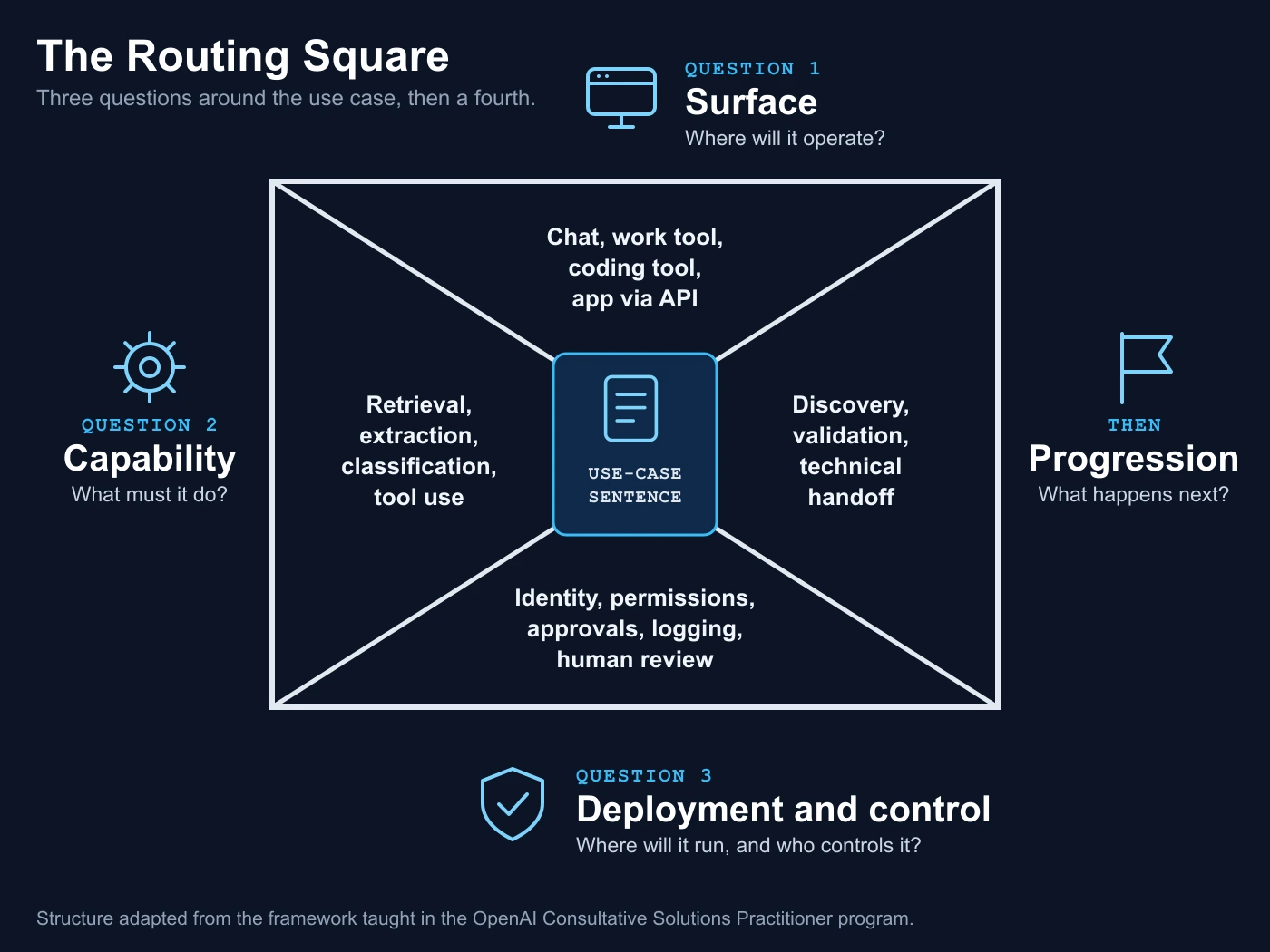
Two rules help. “Agentic” describes a capability, not a separate product. Name each component instead of saying “hybrid.”
The worked example later in the post is built on Azure, but the pattern is portable. Other clouds offer comparable document-extraction and retrieval services, so run the same three questions there.
With a route in view, the next job is to check whether the customer is ready to move on it. Fit and readiness are separate tests, and mixing them up is where handoffs fail.
Fit Is Not Readiness
Fit asks whether the direction matches the workflow, use case and value hypothesis. Readiness asks whether the customer is prepared to move.
An API-built application may fit well. But if nobody has named a product owner, a data source, an integration path, an evaluation approach or a governance review, it is too early for a technical handoff. The honest next step is a validation session. Match the next step to the evidence:
| What you see | Next step |
|---|---|
| Problem or stakeholder evidence is weak | Keep discovering |
| Use case and value are clear, requirements are uncertain | Run a validation session |
| Technical, data, security or governance questions are material | Bring in the right technical or deployment owner |
| The customer is replacing an existing tool | Map current and target state |
| Evidence, value, readiness and route are clear | Prepare a structured handoff |
Do not use handoff to escape ambiguity. A good handoff note never says “Customer needs API.” It says what is known, what is assumed, what needs validation, who owns the next step and which decision that step enables.
Someone outside the original conversation should be able to pick it up without restarting discovery. Here is one, filled in for the insurance case:
A handoff note filled in for the insurance case.
What a validation session is
A validation session is a short working meeting that turns assumptions into evidence before anyone commits to a build. It is not a demo and not a design review. My suggested agenda:
- Walk the workflow: with the person who does the work, and agree the one-sentence use case.
- Set the baseline: time a complete file from start to finish.
- Test the route: run a small sample and note every point where a person had to step in.
- Assign owners: who handles exceptions and who maintains the connections.
- Decide the next step: another round, a technical handoff or stop.
Two Checks Before You Recommend Anything
A bank and a hospital need different questions
Document review looks different in a bank, a hospital and a life-sciences company: different stakeholders, data boundaries and approval steps. You don’t need to be an industry expert. Read five evidence areas:
- Workflow: the process, handoffs, systems and outputs.
- Stakeholders: who sponsors, uses, approves and operates it.
- Risk: business, legal, regulatory, data and reputation concerns.
- Governance: approvals, oversight, permissions, audit needs.
- Success metrics: how the customer will judge improvement.
Name legal, regulatory and security questions and bring in the qualified owner. A signed business associate agreement, the US healthcare data contract, doesn’t cover every feature, so ask the technical and compliance owners to confirm the services, configuration and intended use before sensitive data is processed.
A good demo needs an owner to become a process
If the work repeats, settle these before you recommend anything:
- What starts each cycle, and what counts as an accepted result?
- Who reviews exceptions?
- Whose account runs the work, and who maintains the connections?
- How current must the sources be, and who pays for usage?
- What happens when the owner leaves?
Then test across several runs against the current workflow. One good output proves very little.
Worked Example: Insurance Document Review
Work in progress: I’m building an Azure AI landing zone for an insurance document use case. The business asked for a lot: find missing documents, spot KYC gaps, catch fraud signals, cross-sell and stay profitable.
That’s five projects, not one. I split them by risk:
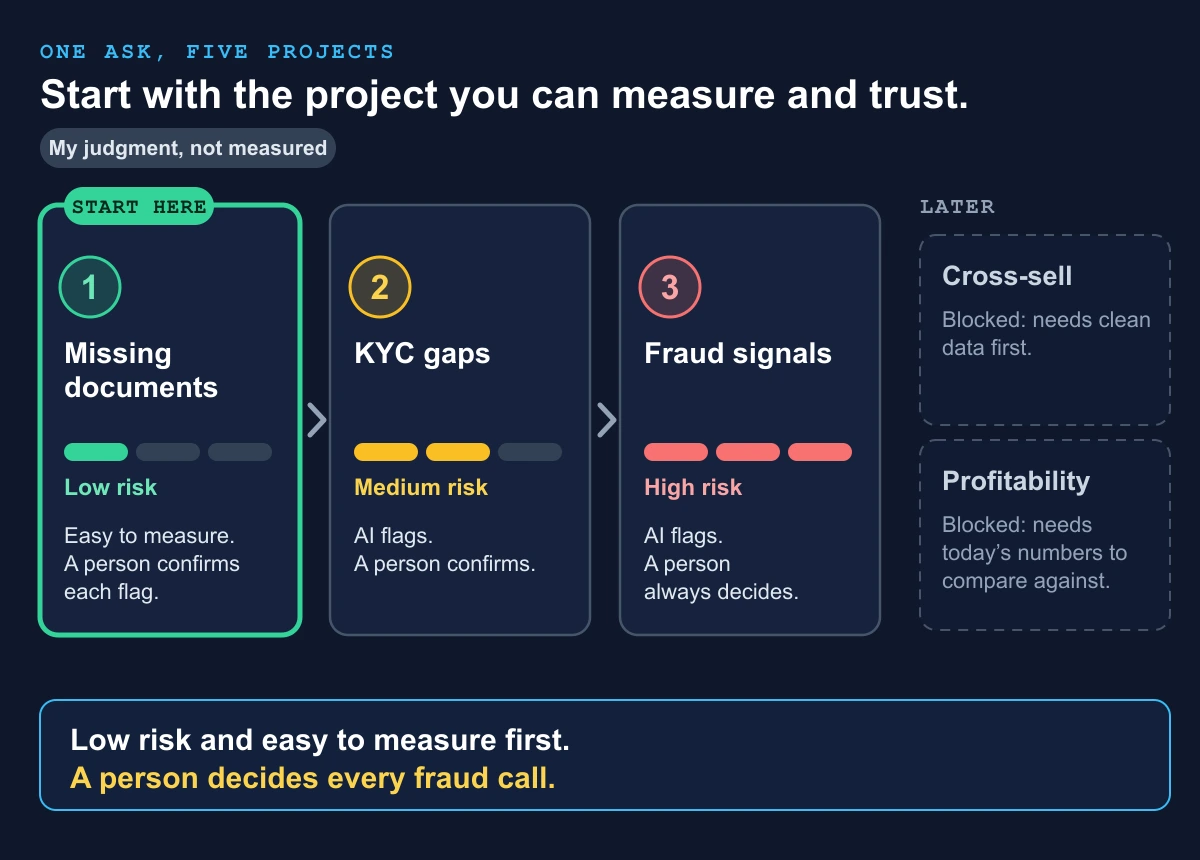
The first target is narrow: the intake check from the handoff note, with a person confirming each flag. The value hypothesis is modest: incomplete files cause much of the delay, so flagging gaps early could cut rework. It is a bet to test, not a claim.
The landing zone comes first: identity, private networking, audit logging and the right data region. You can’t add these after the demo.
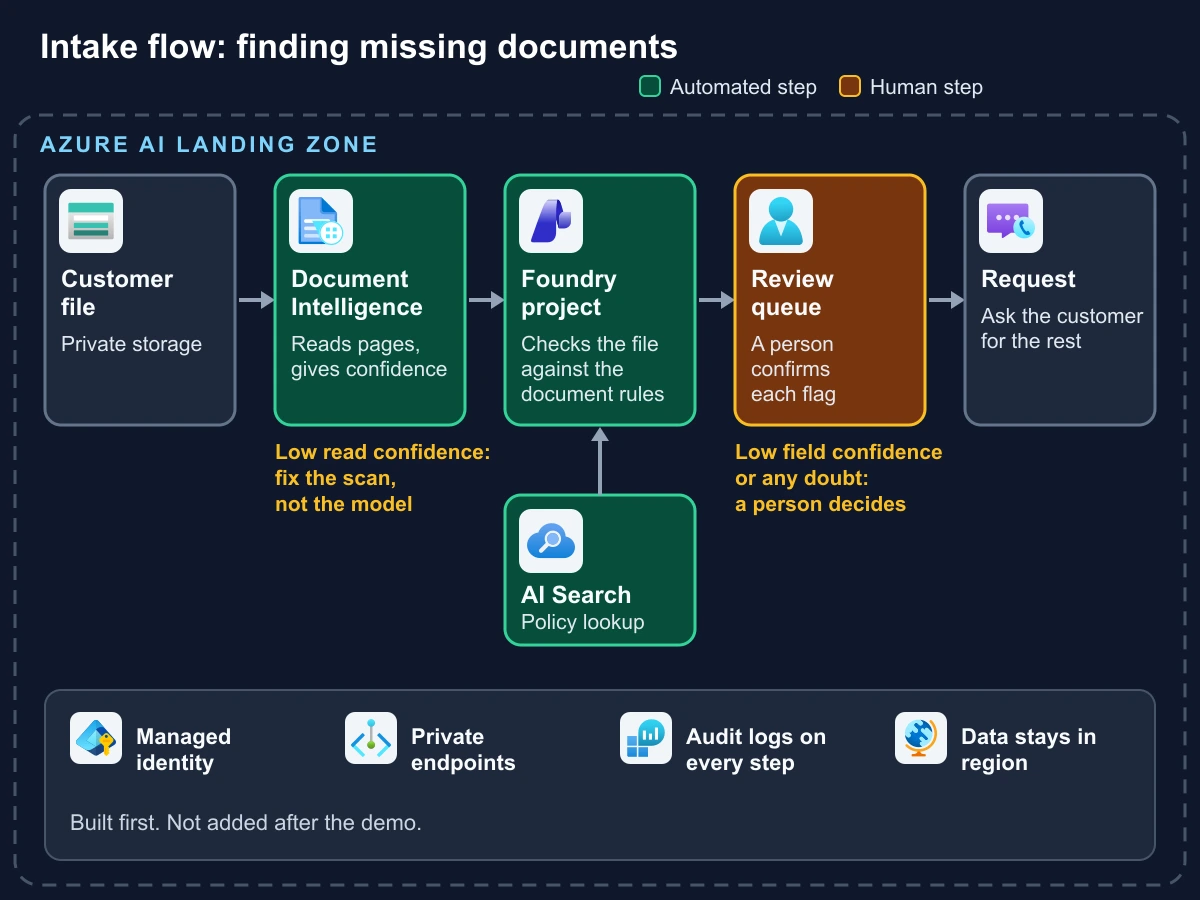
A fair question: why use a model to check a fixed list of required documents? Plain rules can do that. The model earns its place when the files are messy, such as mixed scans, missing labels or free-text covering notes. Test the rules-only version first and keep whichever is cheaper at the same accuracy.
Regulation sits inside the landing zone too. Name who signs off on data residency, retention and any rules on automated decisions in the customer’s market, and bring in that owner early. For the foundations, see Azure landing zones and the AI hosting decision tree.
A confidence score is not a truth score.
Microsoft’s guidance treats two signals separately. Low read confidence points to poor input quality, so improve the document. Low field confidence points to documents that differ from the type the model expects. It also says to consider human review, and to aim for close to 100% accuracy on sensitive records such as financial or medical files. (Microsoft Learn: accuracy and confidence)
My own practice goes one step further: set review thresholds from measured errors on the customer’s own documents, and check extracted fields against business rules.
Before anything runs, I will time a complete file. No starting number, no claim. Until it is measured, it is capacity, not savings.
What a Public Reference Build Proves, and What It Doesn’t
Public reference builds shorten the build. They don’t prove the outcome.
A sample build shows that something can work. It doesn’t show that it will work for your customer.
Microsoft published an open-source hackathon, Claims Processing with Microsoft Foundry Agents (MIT license; the owner archived it on 9 August 2026, so it is read-only).
A second public repo, MicroHack-AI, covers similar ground with separate agents for policy checking, claim review and risk analysis, ending in a summary for human review. Both are training material, not customer deployments, and I treat them that way.
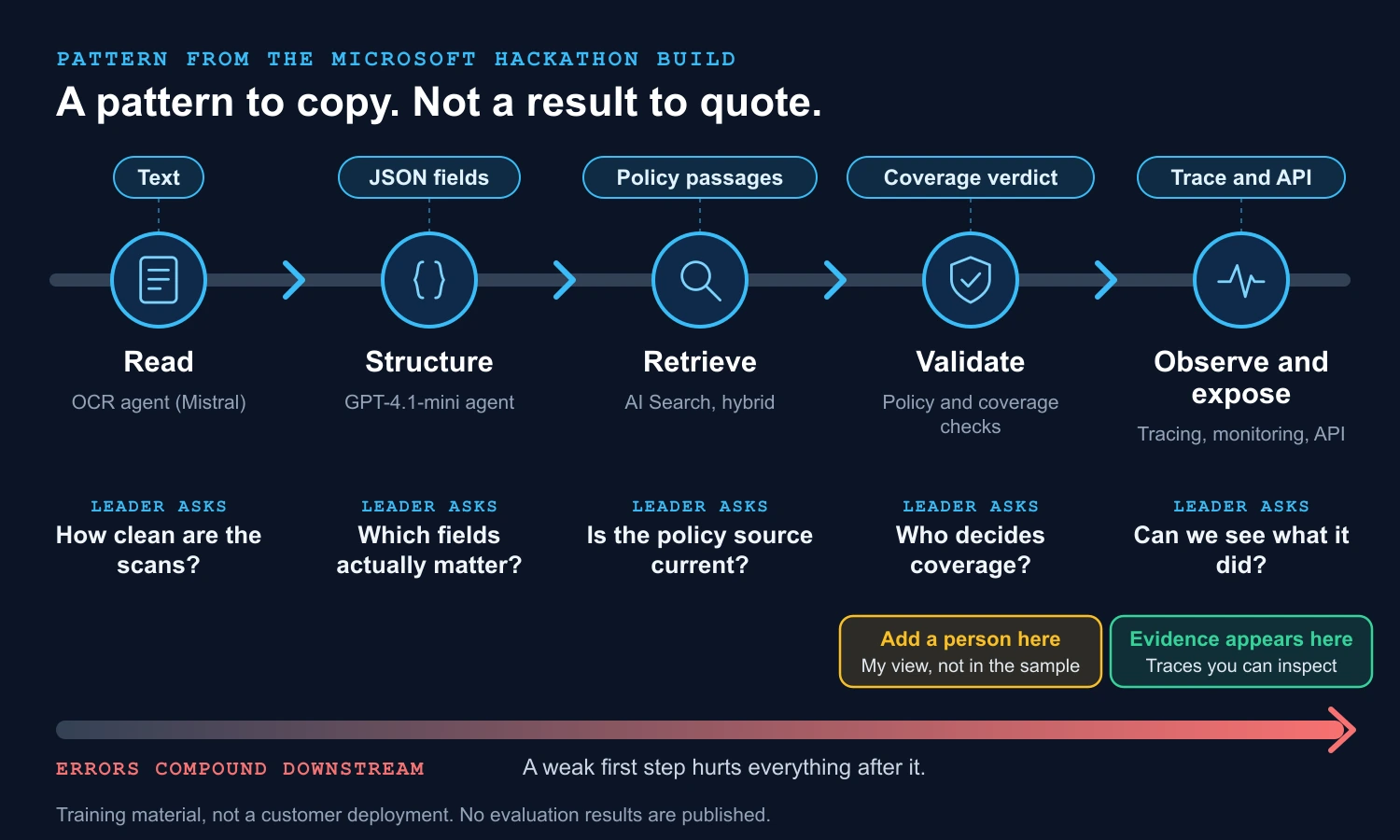
What the Microsoft build gives you, and what it leaves out
| It gives you | It does not give you | Leader’s action |
|---|---|---|
| A working pipeline pattern | Measured accuracy or a baseline. Neither repo publishes evaluation results. | Treat it as a head start, not evidence. |
| A comparison of document-processing methods | Identity, networking, audit and data-region design for a regulated buyer. | Add your own landing-zone plan. |
| Tracing and monitoring before the user interface | Ongoing fixes. The Microsoft repo is archived and read-only. | Confirm ownership, license and model versions before reuse. |
| Policy matching as its own step | A customer’s own documents. | Test on the customer’s files before any claim. |
The gate before a customer sees it
Both repos expect you to deploy resources yourself in a supported region, and neither covers what a buyer’s security team asks first. That gap is where pre-sales work lives. Five things must exist before a sample like this goes near a customer:
| Before it goes near a customer | Why it matters | Suggested owner |
|---|---|---|
| A baseline: how long a complete file takes today | No starting number, no claim. | Workflow owner |
| Measured accuracy on the customer’s own documents | Shows it works for them, not for a sample. | Delivery lead |
| Review thresholds set from those measured errors | Decides what a person must check. | Delivery lead with the workflow owner |
| An identity, networking, audit and data-region plan | It is what the buyer’s security team asks first. | Security architect |
| A named owner for exceptions | Someone must own what the AI gets wrong. | Workflow owner |
Owners are suggestions. Match them to your own team.
Three questions for a sponsor
- Does the sample cover our documents?
- Who maintains it?
- What evidence will we produce before we rely on it?
The One-Page Cheat Sheet
One page, seven stages. Tick a stage only when you can back it with evidence; the line under each shows the mistake to avoid. Your progress is saved in this browser.
0 of 7 stages evidenced. Start with Discover.
Closing Thought
Strong pre-sales work comes from asking the best questions in the right order, and being honest about what is still unknown.
So the next time a customer says “we need AI,” try this first question:
“What job does AI need to do in this workflow?”
Now go back to the title. “We need AI” is a clue. “At intake, AI flags missing documents in each customer file, while a person confirms and requests the rest, so file completeness improves” is a requirement. The distance between the two is the job.
Questions Leaders Ask
Short answers for skimmers. Each one links to the full section.
1What should I ask for before funding an AI pilot?
A one-sentence use case, a named owner and a measured baseline. If any of the three is missing, fund a validation session first. The use case must name the workflow step, the user, the AI output, the human role and the outcome.
2Is time saved the same as money saved?
No. Saved hours are capacity first. They become savings only when they turn into avoided hiring, a real cost cut or other measurable value. Until a baseline exists, call it capacity, not ROI.
3Which AI project should we start with?
The lowest-risk one that is easiest to measure. Rarely the biggest idea. Pick the viable candidate that hits real pain, produces evidence fast, has visible support and leaves room to grow.
4When is the team ready for a technical handoff?
When evidence, value, readiness and route are all clear. If nobody has named a product owner, a data source, an integration path, an evaluation approach and a governance review, the honest next step is a validation session.
5Where should a person stay in the loop?
Wherever an error is costly or hard to reverse. In the insurance case, AI flags possible fraud and a person always decides. In sensitive areas such as insurance, legal, medical, credit and hiring, people stay accountable.
6What should I ask on an AI discovery call?
Five questions about the work, not the tool. Who does the work today? Where is it slow, costly, risky or inconsistent? What output should improve? Where would AI touch people, systems, tools or data? What value does the customer expect?
Sources
Checked on 27 October 2026. Product names and capabilities change, so verify them before you rely on them.
- Microsoft Learn: Interpret and improve model accuracy and confidence scores
- Claims Processing with Microsoft Foundry Agents Hackathon (MIT license, archived by the owner on 9 August 2026)
- MicroHack-AI: multi-agent insurance claims processing on Azure
- Azure service icons in the intake diagram are Microsoft’s official Azure architecture icons.
- The handoff-note structure is adapted from the framework taught in the OpenAI Consultative Solutions Practitioner program. All diagrams are my own drawings.
- OpenAI Consultative Solutions Practitioner credential
I hold the OpenAI Consultative Solutions Practitioner certification (issued October 2026). The views here are my own, based on my study of the program and public Microsoft documentation.
Want a second opinion on an opportunity?
If you want a second opinion on a use case or a value hypothesis, get in touch. The template is a quick way to prepare.